
UGREEN Nexode 200W GaN USB C Charger
4.7Editor score
200W total charging capacity
Up to 140W per USB-C port
Four ports for mixed devices
Our high wattage USB C charger guide compares 10 powerful options for laptops, phones, tablets, travel, multi-device charging, displays, safety, and value.
A high wattage USB C charger is built for demanding devices such as large-screen laptops, tablets, phones, and other connected equipment that benefits from rapid power delivery. The strongest choices combine useful port selection, intelligent power allocation, thermal protection, and portability, making them far more versatile than basic single-port adapters.
This guide compares ten chargers based on total output, maximum single-port performance, port count, supported device types, safety features, included accessories, displays, folding designs, and travel practicality. It covers desktop charging stations, compact wall adapters, multi-laptop models, and value-focused options without treating the largest wattage figure as the only measure of quality.
Each review reveals which setup benefits most from a particular charger, whether that is powering several laptops, reducing cable clutter, monitoring charging details, or traveling with one compact adapter. Product ratings and specifications reflect the available listing information, while current prices and promotions can change, so shoppers should confirm the latest offer and device requirements before buying.
4.7Editor score

4.7Editor score

4.6Editor score
The table below compares all ten chargers by their headline power, maximum USB-C output, port configuration, portability, and most important feature, making it easier to identify the right option for a single device, multiple devices, or a demanding multi-laptop setup.




This 380W charging station is a substantial desktop solution for users who want to connect several demanding devices to one power point. It carries a 4.4 rating and stands apart through its eight-port arrangement, two USB-C ports capable of 100W each, and four included USB-C cables. The package also provides a 100W braided charging cable, making it especially convenient for people setting up a shared desk or travel station.
We may earn a commission when you buy through this link, at no additional cost to you.
Its strongest advantage is the breadth of simultaneous charging. The listed power distribution includes two 100W USB-C connections, three 30W USB-C connections, and three 30W USB-A connections. That allows a powerful laptop to receive a dedicated high-wattage connection while phones, tablets, earbuds, and other accessories use the remaining ports. Automatic allocation is especially useful because the available output can adapt as the connected device mix changes.
The product also uses GaN III generation technology, multi-protection circuitry, premium microchips, and upgraded heat dissipation to support a compact desktop footprint. Its universal 100-240-volt input broadens international usefulness. The included 3.3-foot and 6.6-foot cables offer different reach options, while the separate 5-foot power cord gives the unit some flexibility in placement.
This is the most complete choice for a desk shared by numerous devices or for anyone who wants a laptop charger and everyday charging hub in one package. It is less attractive for minimalist travel because the eight-port station and cable collection occupy more room than a compact wall adapter. Buyers should also verify that their devices support the relevant charging protocols and that their combined power needs justify the larger design.
Two 100W USB-C ports and six additional connections make this station practical for a laptop-centric desk that also handles phones, tablets, accessories, and legacy USB-A devices. It can replace several separate charging bricks while keeping the workspace visually organized.
The package contains four USB-C cables, including a 100W braided cable, so users do not need to source a full set of compatible leads before the station becomes useful. Different cable lengths also provide flexibility between nearby desks and wall outlets.
We may earn a commission when you buy through this link, at no additional cost to you.
The Anker 317 is a focused single-port charger for anyone who wants high-wattage laptop charging without carrying a large desktop station. It has a 4.6 rating, provides up to 100W through USB-C, and includes a five-foot USB-C to USB-C cable. Its folding plug and compact construction make it particularly useful for travel, office bags, and temporary workspaces.
We may earn a commission when you buy through this link, at no additional cost to you.
The principal strength is simplicity. A 100W USB-C connection can support a broad range of compatible devices, from phones and tablets to demanding notebooks. The listed charging example says a 16-inch MacBook Pro with M1 Max can reach full charge in one hour and twenty minutes, illustrating why this output level is meaningful for users who need a productive laptop quickly.
Safety is handled through Anker's ActiveShield system, which provides continuous temperature monitoring. The cable is stored behind a plastic tray compartment, an unusually neat arrangement that helps prevent the lead from becoming tangled or left behind. Anker also includes a welcome guide, an 18-month warranty, and customer support as part of the package.
This charger works best for a traveler or professional who primarily charges one device at a time. It offers less flexibility than the multiport models in this guide because a second phone, tablet, or accessory cannot be connected concurrently. For someone who values portability, trusted safety monitoring, and straightforward 100W performance more than simultaneous charging, it remains an especially compelling choice.
PowerIQ 3.0 technology supports a wide compatibility range, allowing the charger to serve laptops, phones, and other mobile devices. This makes it a versatile daily adapter even though it contains only one port.
The folding plug protects the prongs during transport, while the included cable can remain stored with the charger. Together, these details reduce the chance of arriving at a destination without a usable charging lead.
We may earn a commission when you buy through this link, at no additional cost to you.
The UGREEN Nexode Pro 160W combines one of the strongest feature sets in this guide with a 4.7 rating. It offers 160W total output, four USB-C ports, one USB-A port, a foldable plug, and a rotatable touch display. Individual USB-C ports can support up to 140W, giving the charger enough headroom for high-performance notebooks as well as several smaller devices.
We may earn a commission when you buy through this link, at no additional cost to you.
The display is the most distinctive feature. It can present total output wattage, power assigned to each port, the active charging protocol, and internal temperature status. An animated expression adds visual character, while the touch panel makes the information accessible without opening an app. For users who want to understand how a charger is distributing power, this visibility is genuinely more useful than a simple indicator light.
Its power-management system automatically allocates output according to connected devices. The listed multiport configuration can charge a MacBook, iPhone, Galaxy device, AirPods, and tablet at the same time. Protection circuitry covers overheating, overvoltage, overcurrent, and short circuits, while dual smart temperature-control modes add another layer of thermal management.
This is the most balanced recommendation for someone who wants serious charging performance without moving to a desktop-class 200W or 300W station. It remains portable enough for business travel, yet it handles a laptop and several accessories at once. Buyers who do not care about real-time power data can still benefit from its strong output and broad port selection, while those who value detailed visibility will find the display particularly useful.
The rotating display gives immediate feedback on total wattage, per-port allocation, charging protocol, and temperature. This can help identify whether a device is receiving its expected power level or whether the charger has redistributed output across multiple connections.
Despite its five-port capacity and 160W total output, the folding plug and GaN construction keep the unit more manageable than a typical desktop power strip. It suits a work bag better than the larger charging stations in this list.
We may earn a commission when you buy through this link, at no additional cost to you.
Anker's 100W Max three-port charger is built around an unusual balance: a high 100W ceiling in an unusually small frame. It carries a 4.7 rating, measures 2.72 by 2.17 by 1.34 inches, and includes a foldable plug, a smart display, and a 4.9-foot USB-C to USB-C cable. It is a strong candidate for people who carry a laptop but want a charger noticeably smaller than a standard wall block.
We may earn a commission when you buy through this link, at no additional cost to you.
The charger can deliver a steady 100W output on a USB-C connection, and the listing says this performance can be sustained for longer than the average 100W charger. A high-definition screen presents charging status, temperature, and port performance. That information is particularly helpful because a multiport charger may reduce output when more than one device is connected, and the display provides a quick way to check the active allocation.
Another notable feature is its automatic low-current mode. When output remains at or below 5W for one minute, USB-C2 or USB-A can switch to a 95W plus 5W arrangement, allowing low-power devices such as earbuds to charge safely alongside a higher-power connection. This adaptability makes the adapter more useful across a broader mix of personal electronics.
This model fits a traveler, student, or hybrid worker who regularly charges one laptop alongside one or two smaller devices. It is less suitable for users who need two simultaneous high-wattage laptops or a large collection of connected accessories. Even so, its compact dimensions, clear display, and three-port flexibility make it one of the most travel-conscious high-wattage chargers here.
The display turns an otherwise invisible charging process into something users can monitor. Temperature and port data can be especially valuable when combining a laptop with accessories that have different power requirements.
Low-current mode helps prevent low-draw earbuds and other small devices from being overwhelmed when a larger device is connected. It is a practical refinement that broadens the charger's everyday usefulness.
We may earn a commission when you buy through this link, at no additional cost to you.
The Amazon Basics 120W Nano is a practical multiport wall charger for shoppers who want more capability than a simple phone adapter without moving to a large desktop station. Its 4.2 rating is the lowest among the ten products, but the specification sheet remains strong: two USB-C ports, one USB-A port, a 120W headline capacity, and up to 100W from a single USB-C connection.
We may earn a commission when you buy through this link, at no additional cost to you.
The most important consideration is how output changes when multiple devices are connected. The listed configurations allow C1 and C2 to deliver 60W each, a USB-C and USB-A combination to deliver 100W plus 12W, and all three ports together to provide 60W, 45W, and 12W. These detailed allocations make the charger appropriate for a laptop, tablet, and phone, although its headline number is not what every port receives simultaneously.
Travel convenience comes from the 2.7 by 2.7 by 1.3-inch body, folding plug, and universal 100-240-volt input. The charger also includes protection against overcharging, overvoltage, overcurrent, and short circuits. Its understated design and straightforward port layout may appeal to buyers who do not need a display, touch controls, or a large collection of bundled cables.
The main trade-off is that a charging cable is sold separately. That makes it less convenient for a first-time setup than several bundled-cable alternatives. However, it can be an attractive option for anyone who already owns suitable USB-C leads, wants a compact three-port adapter, and prefers a familiar charger design without unnecessary display features.
The detailed single-, dual-, and three-port output figures make it easier to predict performance. Buyers who need 100W should reserve a USB-C port for that device and plan lower allocations for simultaneous accessories.
A folding plug reduces transport bulk, while 100-240-volt universal input allows use in many regions. The listed dimensions also make this one of the easier options to carry between a home, office, and travel bag.
We may earn a commission when you buy through this link, at no additional cost to you.
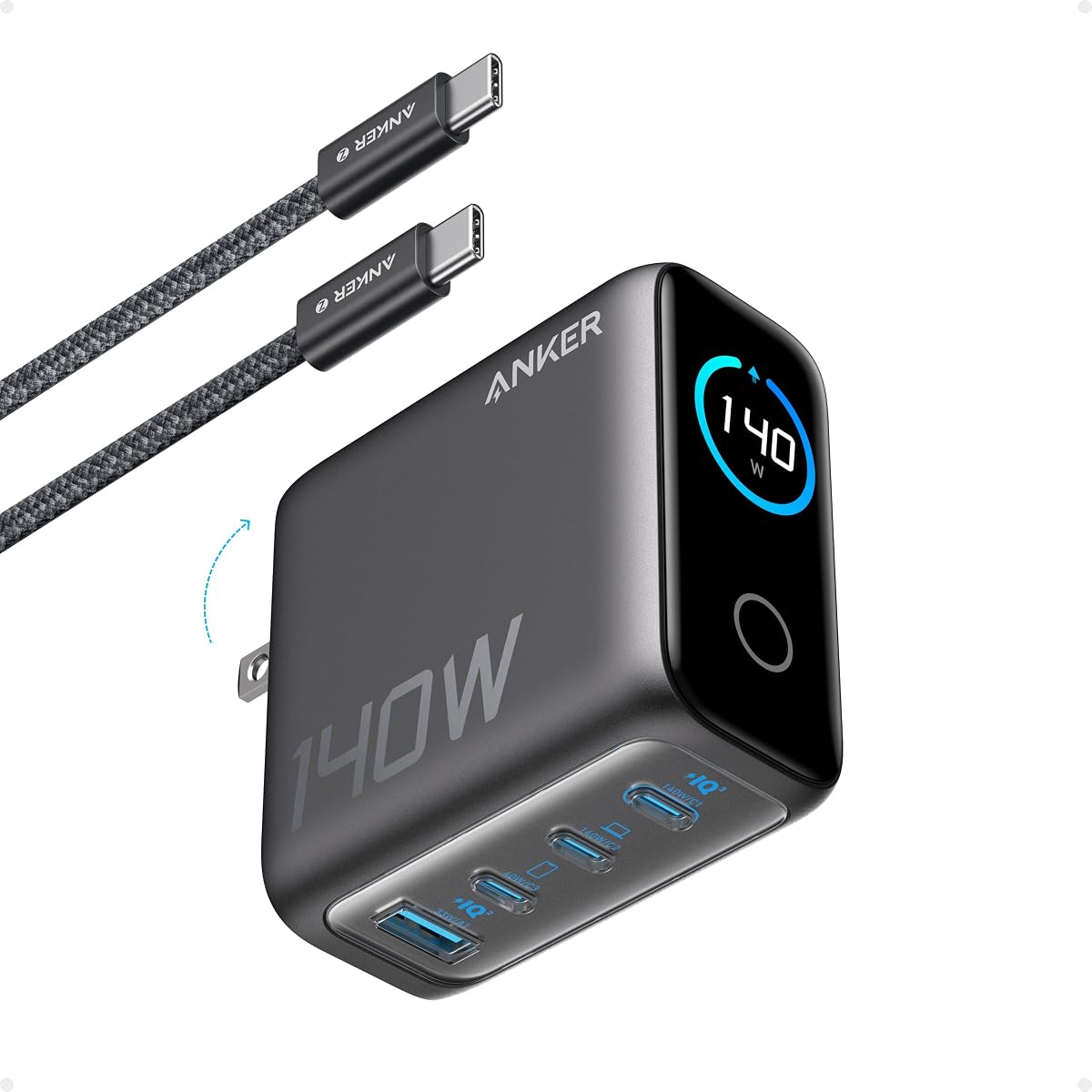
The Anker 140W Max four-port charger is a high-output desktop adapter designed to handle demanding notebooks while retaining room for three additional connections. It has a 4.3 rating, measures 2.72 by 2.72 by 1.42 inches, weighs 9.7 ounces, and uses GaN technology. Two high-speed USB-C ports can each provide a maximum of 140W.
We may earn a commission when you buy through this link, at no additional cost to you.
The listed charging performance says either USB-C port can bring a 15-inch MacBook Air to 50 percent in 30 minutes. Although only two ports reach that headline level, the charger can power four devices at once, making it suitable for a desk with a laptop, phone, tablet, and accessory. Automatic allocation manages the shared output, while a color display provides charging status, temperature, and port details.
Thermal management is a major selling point. ActiveShield 4.0 monitors device temperatures more than 10 million times per day, according to the listing. The package also includes a five-foot 240W USB-C to USB-C cable, allowing the charger to be used immediately with compatible devices without requiring the user to purchase an additional high-capacity lead.
This model is most appropriate for a user who values two very powerful USB-C connections and detailed operating information. Its four-port format reduces the need for multiple wall adapters, though the lack of a listed USB-A connection means older accessories still require an appropriate adapter. It is a strong middle ground between compact travel chargers and larger desktop charging stations.
Two ports capable of reaching 140W each provide a meaningful upgrade for power-hungry notebooks. They also give a user flexibility to place the cable in whichever orientation or location is more convenient at the desk.
The color display and frequent temperature monitoring make it easier to confirm that charging is proceeding normally. This visibility is useful when several devices share the charger and output is allocated dynamically.
We may earn a commission when you buy through this link, at no additional cost to you.
Anker's Nano Charger 100W is built for people who treat charger size as a meaningful travel constraint. It carries a 4.4 rating, weighs just 4.23 ounces, and is described as comparable in size to the latest AirPods Pro. Despite that compact body, it provides up to 100W and can charge a 14-inch MacBook Pro to 50 percent in 27 minutes.
We may earn a commission when you buy through this link, at no additional cost to you.
The durable matte prongs are intended to keep the charger securely in place, addressing a common weakness of ultra-small wall adapters. A six-foot USB-C cable is included, which is long enough for many desk arrangements and reduces dependence on a wall outlet located directly beside the device.
ActiveShield 2.0 monitors temperature three million times per day and adjusts power output to help protect connected devices. Although the charger has one USB-C port, its 100W maximum is sufficient for many USB-C laptops and can also serve compatible tablets and phones. The package includes a welcome guide and a 24-month warranty, extending the stated coverage offered with this model.
This is the pick for a traveler who needs genuine laptop-class power from the smallest adapter in the guide. It cannot charge a phone and laptop together, so users who regularly travel with several devices may prefer the Anker Compact Foldable 100W or a multiport model. For a single primary device, however, the Nano delivers an attractive combination of power, weight, and simplicity.
A 4.23-ounce body and 100W output create a useful balance for travel. Users can carry a capable laptop charger without adding the weight and footprint of a larger adapter.
The durable matte prongs help the charger remain secure in place. This is especially useful in loose wall outlets or when a connected cable places some sideways force on the adapter.
We may earn a commission when you buy through this link, at no additional cost to you.
The UGREEN Nexode 200W is the premium choice for users with multiple demanding devices and no interest in maintaining a separate adapter for each one. It has a 4.7 rating, supplies 200W total, and offers three USB-C ports plus one USB-A port. A single USB-C connection can provide up to 140W, while the charger is specifically designed to support two laptops simultaneously.
We may earn a commission when you buy through this link, at no additional cost to you.
The listed charging result for a 16-inch MacBook Pro with M4 is 56 percent in 30 minutes when using the high-output port. Dual-laptop support is the standout feature for professionals using a primary work computer alongside a secondary notebook, a demanding tablet, or another power-hungry device. The remaining USB-C and USB-A connections keep smaller accessories within the same charging system.
Its GaN construction and foldable wall plug preserve portability despite the 200W ceiling. Compatibility is broad, including MacBook Pro and Air models, Dell XPS, HP laptops, Acer Aspire systems, iPads, recent iPhone generations, and Galaxy S25 and S24 devices. That cross-platform support makes the charger useful for mixed-ecosystem offices rather than only Apple-focused workspaces.
This is an excellent premium pick for a power user who regularly operates more than one laptop. The trade-off is that four-device charging still involves power sharing, so it should not be interpreted as 200W available to every port at once. It is also excessive for someone who only charges a phone, but for a demanding mobile workstation, the output and port flexibility justify the larger proposition.
Dual-laptop support distinguishes this charger from ordinary three-port adapters. The additional total headroom gives demanding notebooks and tablets a better chance of receiving the power they require at the same time.
Three USB-C ports, one USB-A port, and a 200W total ceiling cover both current and legacy accessories. The foldable plug keeps the charger practical for professionals who move between home, office, and hotel workspaces.
We may earn a commission when you buy through this link, at no additional cost to you.
The UGREEN Nexode 300W is the most powerful charging station in this guide, carrying a 4.5 rating and a 300W total output. Its five-port design can support as many as five connected devices, with three USB-C connections reaching 140W, 100W, and 60W in the listed three-laptop configuration. It is aimed at demanding desks rather than a single phone or tablet.
We may earn a commission when you buy through this link, at no additional cost to you.
The headline laptop result says USB-C1 can bring a 16-inch MacBook Pro from zero to 56 percent in 30 minutes. USB-C2 can provide 100W and USB-C3 can provide 60W when three notebooks are connected. These allocations show why the 300W total matters: it creates enough headroom for multiple laptops instead of merely adding more low-power ports to a modest adapter.
Compatibility includes MacBook Pro, Air, and Neo models, Dell XPS systems, recent iPhone generations, multiple Galaxy series, iPad Air and Pro, Google Pixel models, and Steam Deck. Safety features guard against overcurrent, overheating, and short circuits. The package includes the charging station, a power cable, a five-foot 240W USB-C to USB-C cable, and a user manual.
This station is a strong choice for a shared professional desk, a home office with several computers, or a team area where reducing individual adapters matters. Its size and output are excessive for travel or simple personal charging. Buyers should first inventory their connected devices and their charging requirements so the station's capabilities are used rather than left idle.
The listed 140W, 100W, and 60W allocations create three tiers of laptop power from one unit. This makes the station more versatile than a standard multiport adapter for offices with varied computer requirements.
Five ports and 300W total output can consolidate numerous personal devices into a single charging point. It is particularly relevant where several employees or family members regularly connect phones, tablets, and computers.
We may earn a commission when you buy through this link, at no additional cost to you.
This two-pack of 85W three-port adapters is a practical choice for buyers who want charging capacity in more than one location. Each block has a 4.6-equivalent product rating as listed, two USB-C ports, and one USB-A port. The pair can serve a home desk and an office, a bedside table and a travel bag, or two separate work areas without requiring a second purchase.
We may earn a commission when you buy through this link, at no additional cost to you.
Within each adapter, the primary USB-C port delivers up to 65W, which the listing says can charge a MacBook Pro to 50 percent in 30 minutes. The second USB-C connection provides 20W, while the USB-A port supplies 18W. A laptop, phone, and pair of earbuds can therefore be connected at once for common desk and travel arrangements.
Safety measures include intelligent thermal sensors intended to maintain temperatures below 115 degrees Fahrenheit. The charger also provides protection against overcurrent, overvoltage, overheating, and short circuits, and it uses flame-retardant materials. Compatibility extends across PD-enabled MacBook and iPad models, numerous iPhone and Galaxy devices, Google Pixels, Nintendo Switch, AirPods, and other USB-C or USB-A products.
The two-pack format is the defining advantage, while the 85W ceiling is the main limitation. It cannot match the 140W single-port delivery of the premium models and may not satisfy every high-performance notebook, especially when multiple devices draw power simultaneously. For mainstream laptops, tablets, and phones, however, it offers a convenient balance of portability, multiport flexibility, and placement flexibility.
Two complete charging blocks make it easy to establish a consistent setup at home, work, or while traveling. One can remain on the desk while the other stays packed with a bag and laptop.
The 65W primary connection is appropriate for many mainstream USB-C laptops, while the 20W USB-C and 18W USB-A outputs cover common phones, tablets, and earbuds. It prioritizes broad everyday use over extreme single-port performance.
We may earn a commission when you buy through this link, at no additional cost to you.
The right high wattage USB C charger depends on the devices you own, the number of simultaneous connections, and whether portability or desktop capacity matters most. Output ratings, port allocation, thermal controls, and charging-protocol support should be considered together rather than as isolated numbers.
A charger's total wattage describes the combined power available to all connected devices, while its maximum single-port output describes what one device can receive under the right conditions. A 300W charger may not deliver 300W to a single phone or laptop. Look for a clear maximum USB-C output, particularly if you own a large-screen notebook or a gaming computer. Models with 100W to 140W per USB-C port provide substantial laptop headroom, whereas lower-output adapters are better suited to mainstream ultraportables, tablets, and phones.
More ports can simplify a desk, but the count is only useful when the charger can allocate power fairly. Two USB-C and one USB-A is a common travel arrangement, while four or five ports suit shared workspaces. Check whether older accessories need USB-A and whether the product includes enough USB-C cables. A wall adapter for one primary laptop may be more reliable than a crowded multiport unit, whereas a family or office setup benefits from simultaneous phone, tablet, watch, and notebook charging.
Charging two or three laptops requires substantially more headroom than charging a laptop and a phone. Some high-output chargers explicitly support two notebooks, while a 300W five-port model lists separate 140W, 100W, and 60W laptop allocations. Read the stated simultaneous-use figures carefully, because advertised total wattage does not guarantee identical output on every port. For occasional dual-laptop work, a 160W or 200W adapter may be sufficient; persistent three-laptop use favors the highest-capacity desktop station.
USB-C is a connector, not a complete promise of identical charging speed across every device. A capable cable and compatible power-delivery profile are needed to reach high output. Chargers that report the active protocol can make troubleshooting easier, while automatic power allocation helps the charger negotiate an appropriate level for each connected product. Before buying, check the device's charging requirements and confirm that the adapter supports the expected protocol, especially for larger laptops that may need USB Power Delivery 3.1.
High output creates heat, so temperature management is a central safety consideration. Look for thermal monitoring, automatic output adjustment, and protection against overcurrent, overvoltage, overheating, and short circuits. ActiveShield, multi-protection systems, and temperature-controlled circuitry are useful indicators that the manufacturer has addressed these risks. Protection does not make improper use safe, so chargers should still be connected to suitable outlets, used with undamaged cables, and kept in ventilated positions rather than buried under bedding or other insulating materials.
Power capability matters little if the charger is inconvenient to carry. Compact single-port models suit one-laptop travel, while folding plugs prevent prong damage inside a bag. Larger multiport chargers make more sense at a home or office desk. Consider the device dimensions, weight, and whether a cable is included. A charger that arrives without a cable may still be the better choice for a user who already owns a suitable lead, but it is less convenient for a new setup or a last-minute trip.
A smart display can show total wattage, per-port allocation, temperature, charging status, and the active protocol. This information is helpful when a laptop charges more slowly than expected or when several devices share the adapter. Touch displays add engagement, but they are not essential to charging performance. For most users, a clear screen is more useful than elaborate controls, while travelers may prefer the smallest possible unit and can usually obtain the same information from their devices.
A high-wattage charger can be limited by a cable that does not support the intended current. Some products include a 100W braided lead, others include a five-foot USB-C cable, and some provide several cable lengths, while one listing sells the cable separately. Check the stated cable rating and length before purchase. Longer leads provide more placement flexibility, but compact coiled or short cables are easier to organize. A product with several suitable cables can deliver a cleaner initial setup, though additional accessories should not outweigh charger safety or power quality.
Begin by checking the input and output requirements of every device you intend to connect. Use the charger on a stable, dry surface with adequate ventilation, and inspect the body, prongs, and cable for cracks, discoloration, or other damage. Connect the charger to the wall first, then attach the device using a cable rated for its charging protocol and power level. For a multiport model, connect the most demanding laptop before smaller accessories so the charger can allocate output appropriately.
Do not use a high-wattage adapter with a damaged cable, an incompatible connector, or equipment that requires a different voltage and current. Avoid placing the charger beneath carpets, bedding, cushions, or tightly packed equipment where heat can accumulate. If a port stops charging, the charger becomes unusually hot, the display reports an error, or a connected device behaves abnormally, disconnect it and stop using the unit until the issue is understood. A dedicated high-wattage cable is also safer than a low-rated cable that merely fits the USB-C connector.
For travel, retract folding prongs before packing the charger and keep the unit in a dry bag or the charging pouch. Coil cables without forcing a sharp bend at the connector, and avoid leaving the charger in a hot car or direct sunlight for long periods. Periodic cleaning with a dry or lightly damp cloth can remove dust from vents and surfaces; do not use liquids that could enter the housing. If the charger is used by several people, keep the charging area uncluttered so connections can be checked quickly and disconnected safely when charging is complete.
The correct wattage depends on the laptop model and the charger protocol it supports. A 65W adapter handles many mainstream ultraportables, while 100W provides more headroom for larger notebooks and faster charging under heavy workloads. Models requiring 140W should be paired with a charger and cable that both support that level. Always consult the laptop manufacturer's power requirements before choosing a charger.
A properly implemented USB-C charger negotiates an appropriate power level with the connected device. Modern chargers generally adjust output for phones, tablets, earbuds, and other lower-power accessories. Compatibility still depends on supported protocols and the condition of the cable. A high-wattage charger is not automatically harmful, but it should not be used to bypass a device's specified input requirements.
Yes, when the charger has enough total output and explicitly supports the intended simultaneous configuration. The 200W UGREEN Nexode is designed for two laptops, while the 300W UGREEN station lists a three-laptop arrangement. Actual performance depends on each notebook's power requirements and the allocation among active ports. Check the simultaneous-use specifications rather than relying only on the total wattage.
Total wattage is the combined output available across all ports, while per-port wattage is the maximum a particular connection may receive. A 200W charger with a 140W maximum port does not provide 200W to that port. It also cannot provide 140W simultaneously from every port unless the manufacturer explicitly states that configuration. Multiport output is normally shared according to the devices connected.
Yes, the cable must support the power level and protocol required by the device. A cable that physically fits may still limit charging speed or prevent high-wattage laptop charging. Look for a suitably rated USB-C to USB-C cable, especially for 100W or 140W configurations. The two-pack 85W adapter and the Amazon Basics 120W Nano do not include a charging cable, so buyers should account for that.
GaN semiconductor technology can support efficient, compact high-power designs, which is particularly useful for travel adapters and multiport chargers. It does not automatically make every charger better, because protocol support, thermal design, port allocation, and build quality also matter. In this guide, GaN appears in many of the smallest and most powerful options, helping explain their practical combinations of capacity and portability.
Modern chargers generally manage power safely, but overnight use is still best approached with normal electrical precautions. Use an undamaged charger and cable, place it on a hard ventilated surface, and avoid covering it with bedding or clothing. Disconnecting it when it is not needed reduces unnecessary heat and wear. If the charger, plug, or cable shows damage, remove it from service immediately.
The ideal number depends on whether the charger is intended for a permanent desk or regular travel. A complete desktop package may benefit from several cables of different lengths, while a travel adapter may need only one reliable USB-C cable. The 380W station includes four USB-C cables, the Anker 140W includes a 240W cable, and the UGREEN 300W includes a 240W USB-C cable. Users should verify their own cable needs before purchase.
The UGREEN Nexode Pro 160W is the most balanced overall recommendation because it combines substantial laptop power, five ports, a travelable folding design, safety controls, and an unusually informative display. The UGREEN Nexode 200W is the stronger premium selection for users who need more headroom and explicit dual-laptop support, while the compact Anker 100W charger offers the simplest route to portable single-device power.
Prioritize the largest device you plan to charge, then examine simultaneous output rather than the headline total. Single-laptop travelers may prefer a small 100W adapter, while shared desks benefit from four or five ports. Displays, bundled cables, USB-A support, and low-current modes can influence convenience, but safe thermal management, supported protocols, and realistic power allocation should come first.
Ratings, product availability, promotions, and current prices can change over time, so shoppers should review the latest listing before purchasing. Confirm the charger dimensions, supported protocols, included accessories, and your devices' input requirements. With those details checked, the right high wattage USB C charger can replace several separate adapters while providing faster, clearer, and more organized charging.