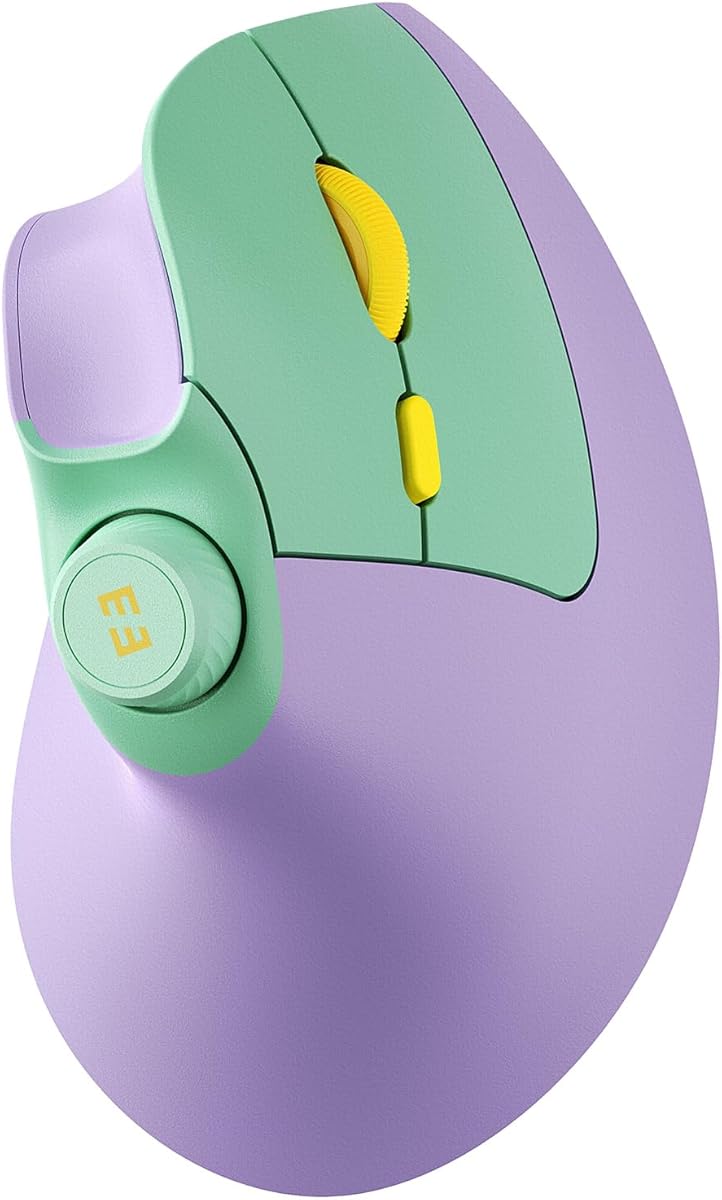
seenda MOU-302 Wireless Ergonomic Vertical Mouse
4.6Editor score
Natural handshake positioning
Three-device wireless switching
Built-in volume controls
Rechargeable 500mAh battery
Explore the best ergonomic mice for wrist pain, comparing vertical designs, hand fit, wireless connectivity, button layouts, battery life, and comfort for work.
Ergonomic mice for wrist pain can reduce the twisting and awkward forearm positions associated with conventional flat mice. The strongest designs place the hand in a more natural handshake posture, but comfort still depends on hand size, grip style, controls, connectivity, and the length of each workday. There is no universal shape that suits everyone.
This guide compares ten vertical and ergonomic wireless mice using the specifications and feature details provided for each product. It considers vertical angle, adjustability, hand-size guidance, button placement, wireless modes, charging or battery design, system compatibility, and practical limitations such as learning curves, incomplete Mac support, and non-silent secondary buttons.
The list begins with models suited to different priorities, from refined everyday ergonomics to multi-device productivity and rechargeable convenience. Each review explains who may benefit most, while the comparison table highlights the important differences. Product prices and availability can change, so check the current listing before making a purchase.
4.6Editor score

4.4Editor score

4.4Editor score
This side-by-side comparison shows how the ten recommended mice differ in hand fit, vertical angle, connectivity, power source, and extra controls. Use it to identify the model that matches your grip, device setup, and workplace priorities.




The Logitech Lift is a 4.4-rated vertical mouse that balances ergonomic design, useful controls, and broad platform support. Its 57-degree shape is intended to promote a more natural forearm and wrist position, while the softly textured grip and thumb rest help distribute pressure during extended use. It is especially well suited to small and medium right hands rather than users who need a full-size or large-hand ergonomic body.
We may earn a commission when you buy through this link, at no additional cost to you.
The standout feature is the combination of Bluetooth Low Energy and Logi Bolt USB connectivity. It works with Windows, macOS, iPadOS, Chrome OS, and Linux, including compatibility with Apple devices. Customizable buttons sit close to the thumb, the clicks are designed to be whisper quiet, and the SmartWheel supports smooth scrolling by switching between ratcheted and free-spinning movement according to the task.
The trade-offs relate primarily to sizing and connectivity complexity. Lift is explicitly marketed for small to medium hands, so a large palm may find its sculpted shape less accommodating. Choosing Logi Bolt also means carrying or storing the receiver, although that mode can be convenient when a computer lacks convenient Bluetooth pairing. The stated battery life reaches up to two years, but actual runtime depends on usage and connection mode.
This is the strongest all-around recommendation for someone seeking wrist-supportive ergonomics without sacrificing everyday productivity features. It combines a clearly stated hand-size target, a moderate vertical angle, quiet operation, flexible scrolling, and broad operating-system support. People with small or medium right hands who work across several devices will likely appreciate it most, provided they are comfortable with the initial adjustment to a vertical grip.
Lift holds the hand at a 57-degree angle so the forearm approaches the desk without the pronounced sideways bend associated with a conventional mouse. That orientation can make long document editing, spreadsheet work, and general browsing feel more relaxed, especially when the mouse is used at desk height with relaxed shoulders.
Bluetooth Low Energy and Logi Bolt provide flexible ways to move between computers and tablets. Easy-to-reach customizable controls, quiet clicks, and the SmartWheel make the mouse useful beyond basic pointing, while its cross-platform support broadens its appeal for mixed work environments.
We may earn a commission when you buy through this link, at no additional cost to you.
The Anker 2.4G Vertical is a 4.2-rated right-handed mouse centered on a simple goal: reduce wrist twisting through a more neutral handshake position. Its scientific ergonomic structure is intended to lessen strain during extended computer use, and the compact dimensions of 120 by 62.8 by 74.8 millimeters make it a practical option for users who do not want a very large desktop mouse.
We may earn a commission when you buy through this link, at no additional cost to you.
Connectivity is refreshingly straightforward. The included 2.4GHz USB receiver stores in the bottom of the mouse, so setup does not require Bluetooth pairing or special software. Optical tracking offers 800, 1200, or 1600 DPI, giving users three levels for general office work, browsing, and more precise tasks. Forward and previous buttons make it easier to move through webpages, while automatic power saving after eight minutes helps preserve battery life.
There are a few compromises to consider. This model is not Bluetooth-compatible, so it cannot connect directly to a tablet or many modern mobile devices without an adapter. It requires two AAA batteries, which are not included, and the product information specifically notes that key-click sounds are unavoidable. That makes it less attractive for shared offices or libraries where quiet operation is important.
Choose this mouse if you work primarily at a desktop or laptop, want a right-handed vertical design, and prefer plug-and-play wireless operation without multi-device pairing. It is a sensible entry into vertical mice, particularly for users focused on basic pointing, browsing, and moderate precision. People who require Bluetooth, silent clicks, or rechargeable power should consider one of the more versatile alternatives in the list.
The stowed USB receiver makes setup predictable: connect it to an available USB-A port and the mouse can be used without account setup or Bluetooth pairing. This direct approach is useful in offices with managed computers, shared workstations, and setups where Bluetooth permissions or drivers may be restricted.
At 3.4 ounces and with relatively compact dimensions, the mouse offers a lighter alternative to many full-size ergonomic models. Its vertical structure reduces forearm rotation, although users accustomed to a flat mouse may still need time to establish a relaxed, slightly angled grip.
We may earn a commission when you buy through this link, at no additional cost to you.
The TECKNET Three-Device is a 4.4-rated vertical mouse that combines six levels of sensitivity with flexible Bluetooth and 2.4GHz operation. Its near-vertical palm position is intended to reduce pressure associated with prolonged use of an inverted mouse, making it a credible choice for right-handed users managing repetitive office or study tasks.
We may earn a commission when you buy through this link, at no additional cost to you.
Its standout capability is seamless device switching. Bluetooth 5.0 and 3.0 support two simultaneous Bluetooth connections, while the included USB-A receiver supplies a separate 2.4GHz mode. A button on the bottom enters pairing when held and changes connection modes when pressed briefly. The 4800, 3200, 2400, 1600, 1200, and 800 DPI settings offer fine control across precision editing and faster movement.
The left and right click buttons are designed to be nearly silent, which is helpful in libraries and shared workspaces, but the additional function buttons are not silent. Mac users should also note that the side buttons are not compatible with macOS. The mouse needs two AAA batteries, which are not included, and it enters deep sleep after approximately 10 to 30 minutes of inactivity. A blinking indicator provides a low-battery warning.
This is a strong recommendation for users who move between a laptop, tablet, and desktop and value pointer precision. It works with Windows, Mac, Chrome, and Linux systems, though Mac-side functionality is limited. It is less suitable for left-handed users, and buyers who want completely silent secondary controls or rechargeable convenience should look elsewhere. Within those boundaries, its sensitivity controls and multi-mode connectivity are especially useful.
The broad DPI range lets users move between slow, detailed cursor placement and rapid on-screen travel. A flashing indicator reports the selected level, reducing the need to open software or guess which sensitivity profile is active.
Two Bluetooth connections plus a 2.4GHz receiver make the mouse well suited to hybrid workspaces. The bottom-mounted connection control is not visible while using the device, so first-time users may need to refer to the pairing instructions, but subsequent switching is designed to be quick.
We may earn a commission when you buy through this link, at no additional cost to you.
The UGREEN Dual Wireless is a 4.3-rated vertical mouse designed with larger hands in mind. Its handshake-style structure aims to reduce wrist rotation and muscle strain, while the fuller shape offers an alternative to smaller ergonomic mice. That distinction matters because a mouse that is technically vertical can still feel cramped if its palm support does not match the user's hand.
We may earn a commission when you buy through this link, at no additional cost to you.
Five main buttons support navigation and regular navigation tasks, and the primary controls are designed to operate quietly. Four adjustable DPI settings—1000, 1600, 2000, and 4000—cover document work, general productivity, and faster cursor movement. PTFE glide feet reduce surface friction and help the mouse glide smoothly across a desk without adding much operational noise.
It supports both 2.4GHz and Bluetooth, with a stated wireless range of up to 10 meters and the ability to switch among as many as three devices. One AA battery powers the mouse, while a smart sleep mode conserves energy. Compatibility extends across Windows, macOS, Linux, ChromeOS, and Android, making it useful for laptops, desktops, tablets, and mixed office stations.
UGREEN is best for a right-handed user with larger hands who wants a quieter vertical design and convenient multi-device connectivity without charging cables. It does not offer the highest DPI range or a rechargeable battery, but those trade-offs are modest for typical productivity work. Buyers who need extra side controls, customization, or a formal ergonomic certification may prefer a more specialized model.
The emphasis on larger hands gives this mouse a different ergonomic profile from models explicitly sized for small palms. A roomier body can distribute contact across the hand more evenly and may feel less constricted during a long workday, provided the fingers can reach the top buttons comfortably.
Quiet primary clicks and low-friction PTFE feet make the mouse suitable for offices and shared rooms. The design prioritizes smooth everyday movement rather than gaming-oriented features, although 4000 DPI remains useful for detailed and fast-paced tasks.
We may earn a commission when you buy through this link, at no additional cost to you.
The ProtoArc EM11 NL is a 4.4-rated rechargeable vertical mouse specifically designed for small to medium hands. Users with hand lengths under 7.5 inches are given a clear sizing target, reducing the uncertainty that often comes with choosing a sculpted ergonomic shape online. The vertical construction keeps the wrist straighter and encourages a more relaxed forearm position.
We may earn a commission when you buy through this link, at no additional cost to you.
It supports dual Bluetooth and 2.4GHz USB-A connectivity, allowing up to three devices to be associated with the mouse. Its built-in 500mAh lithium-ion battery recharges through the included Type-C cable, eliminating recurring disposable battery purchases. Compatibility covers Windows 8 and later, Mac OS X 10.12 and later, and Android 4.3 and later, which makes it appropriate for a range of personal and work devices.
The main drawback is the adjustment period. The manufacturer recommends allowing one to two weeks to adapt because the unfamiliar grip may temporarily disrupt muscle memory. The mouse also uses three standard DPI levels—1000, 1600, and 2400—and the buttons are not programmable. Forward and back controls do not work with Mac OS, and only the left and right click buttons are silent; the scroll wheel and side buttons remain audible.
This is a good option for a small-handed user who values rechargeable convenience, three-device support, and a clearly defined fit. Measuring the hand before ordering is essential because the under-7.5-inch guidance is one of the model’s most useful features. It is less suitable for users who depend on button remapping or want silent operation across every control.
The stated hand-length limit is more useful than a generic small-to-medium label. Measuring from the wrist crease to the tip of the middle finger gives buyers a concrete basis for deciding whether the sculpted palm support is likely to feel comfortable.
The combination of a 500mAh battery, USB-C charging, and three-device connectivity removes much of the friction associated with switching between work and personal systems. The included cable is only for charging, so a compatible receiver must be used for the 2.4GHz connection.
We may earn a commission when you buy through this link, at no additional cost to you.
The Lekvey Rechargeable Vertical is a 4.3-rated mouse designed for medium or large hands. At 5 by 3 by 2.5 inches, it offers more palm coverage than compact vertical models. The shape encourages a neutral handshake wrist and arm position, and the product information notes that many users find the adjustment period relatively short, commonly around three to five days.
We may earn a commission when you buy through this link, at no additional cost to you.
A high-capacity rechargeable battery is the defining practical feature. The manufacturer states more than 150 hours of continuous use on one charge, and the included 150-centimeter Type-C cable makes periodic charging straightforward. There is no need for disposable batteries, and the receiver stores in the bottom of the mouse. Plug-and-play operation without Bluetooth pairing or additional drivers keeps the setup uncomplicated.
The mouse offers three DPI levels at 800, 1200, and 1600, plus page-back and page-forward buttons for web browsing. Its maximum sensitivity is lower than that of several newer models, and it lacks Bluetooth entirely. Compatibility is broad for its 2.4GHz approach, covering numerous Windows versions, Linux, and Mac OS, but it cannot switch among devices the way a dual-wireless model can.
Lekvey is most suitable for medium or large hands that need a fuller vertical body and want to avoid battery replacements. It is especially attractive to desktop users who value rechargeable power and simple receiver-based connectivity. Those who need Bluetooth, high maximum DPI, Mac-compatible side buttons, or multiple stored devices should consider a more connected alternative.
The recommended medium-to-large sizing and roomy 5-inch length provide more support than smaller sculpted mice. This can reduce the sensation of the fingers crowding over the top, although users should still maintain a relaxed grip rather than stretching toward the controls.
The built-in battery removes the need to carry spare cells or wonder whether disposable batteries have lost power during a workweek. Charging through the supplied Type-C cable is simple, and the receiver-based design remains attractive for people who prefer a stable dedicated connection.
We may earn a commission when you buy through this link, at no additional cost to you.
The TECKNET Rechargeable Vertical holds the highest rating in this roundup at 4.6. Its 52-degree vertical angle creates a more natural handshake grip, reducing the sideways forearm position that can contribute to discomfort during long sessions. The design is aimed at small to medium hands, combining ergonomic shaping with a full set of modern productivity functions.
We may earn a commission when you buy through this link, at no additional cost to you.
Bluetooth 5.0 and 3.0 can be paired with two devices, while the included USB-A receiver adds a third connection through 2.4GHz. The 600mAh rechargeable battery can provide up to two months of use after approximately one and a half hours of charging. A Type-C cable is included, and the product information also states a durability rating of six million clicks.
Silent click technology reduces noise by 99 percent, making the model appropriate for libraries, open offices, and shared homes. Six DPI levels range from 800 to 4800, and side-mounted forward and back buttons aid web navigation. However, those side buttons are not available on Mac. The statement about silent operation should also be understood as applying to the relevant click mechanisms rather than every possible sound the mouse can make.
This is an especially compelling budget recommendation because it combines rechargeable power, three-device switching, high sensitivity, and strong feedback without relying on disposable batteries. It suits Windows, macOS, and other compatible systems, but Mac users should account for the side-button limitation. Small- and medium-handed users who switch among several devices will probably receive the greatest benefit.
Two Bluetooth profiles and one receiver-based connection let a user move among a work laptop, personal laptop, and tablet without maintaining separate mice. The USB-A receiver supports plug-and-play use, while Bluetooth is useful when minimizing occupied ports or switching to accessories that also use wireless connections.
The large rechargeable battery reduces the recurring cost and inconvenience of disposable cells. Meanwhile, the six sensitivity levels support everything from detailed spreadsheet work to rapid document navigation, making the mouse versatile enough for everyday productivity.
We may earn a commission when you buy through this link, at no additional cost to you.
The seenda MOU-302 is a 4.6-rated vertical mouse with a feature that distinguishes it from most competitors: a built-in volume knob and media controls. Its natural handshake grip is intended to keep the wrist and forearm straighter during long periods of use, while the media controls make it especially useful for remote workers, streamers, students, and music listeners.
We may earn a commission when you buy through this link, at no additional cost to you.
Three devices can be connected simultaneously through 2.4GHz USB, Bluetooth 1, and Bluetooth 2. That makes the mouse suitable for a hybrid setup involving a desktop, laptop, and tablet. The built-in 500mAh battery lasts up to two months per charge according to the supplied information and recharges through USB-C, avoiding the need to carry disposable batteries during travel or meetings.
The primary controls are designed for noiseless operation, and adjustable DPI levels at 1000, 1600, and 2400 provide a useful balance between precision and faster movement. Compatibility extends across Windows, macOS, iOS, Android, and Chrome OS through Bluetooth or the included 2.4GHz receiver. The most important limitation is that the product information does not give a specific hand-size range, making fit less predictable than with models that publish measurements.
Choose the MOU-302 when quick audio control is central to your workflow or you frequently move among a computer and mobile devices. It combines an ergonomic vertical shape, multi-device support, quiet clicking, and rechargeable convenience in a distinctive package. Buyers particularly concerned about hand size should consider trying it or comparing its shape with a familiar mouse before ordering.
The integrated volume knob allows music and meeting audio to be adjusted without leaving the current application. Play and pause functions sit alongside the control, making the mouse particularly convenient during video calls or entertainment when reaching for a keyboard would interrupt the task.
Simultaneous 2.4GHz and dual-Bluetooth connections support a varied mix of devices. This is valuable for hybrid workers who may begin the day at a desktop, move to a laptop for meetings, and use a tablet for reading or note-taking.
We may earn a commission when you buy through this link, at no additional cost to you.
The Logitech MX Vertical is a 4.4-rated premium ergonomic mouse with a 57-degree vertical angle and a design intended to reduce muscular activity by 10 percent compared with a standard mouse. Its sculpted form supports a natural handshake position, placing the thumb on a dedicated rest and shifting the forearm away from the more acute sideways bend of a flat mouse.
We may earn a commission when you buy through this link, at no additional cost to you.
The 4000-DPI optical sensor is one of its most useful technical features. It is designed to require four times less hand movement than a traditional mouse with a 1000-DPI sensor, and the cursor speed switch allows users to change sensitivity quickly. A smooth textured surface improves grip consistency and gives the mouse a refined feel that suits extended work sessions.
The shape is designed to accommodate a variety of hand shapes and sizes, although it remains a right-handed vertical mouse. The supplied information notes that the wireless USB receiver is included with or inside the mouse. Unlike newer models, it does not advertise Bluetooth, a volume knob, several DPI profiles, or extensive multi-device switching in the provided details, so its appeal rests on physical design and tracking performance.
This is the premium recommendation for a user who values a refined, established ergonomic shape and precise cursor control over the newest connectivity extras. It is well suited to office work involving detailed documents, spreadsheets, design, and general navigation. The premium tier is justified by the physical design and sensor capabilities, but buyers who need Bluetooth or seamless switching among three modern devices should weigh those requirements carefully.
The textured surface and contoured body are intended to feel comfortable while reducing the effort needed to maintain a grip. A thumb rest keeps the upper hand supported, while the angle reduces wrist pressure compared with a traditional mouse.
A 4000-DPI sensor supports accurate movement without requiring large physical gestures, which can help reduce fatigue. The dedicated cursor speed switch makes it convenient to move between precision and faster movement without opening settings software.
We may earn a commission when you buy through this link, at no additional cost to you.
The TECKNET 60-Degree Vertical is a 4.4-rated mouse built around a pronounced scientific vertical grip. Holding the palm inward rather than bending the wrist sharply toward the desk can reduce strain for people who feel discomfort with a conventional mouse. Its 60-degree angle is more upright than the 52- and 57-degree designs elsewhere in this list.
We may earn a commission when you buy through this link, at no additional cost to you.
Productivity is the secondary focus. Six programmable buttons provide thumb-accessible shortcuts, and five adjustable DPI levels allow users to change sensitivity for detailed spreadsheet work or faster document browsing. A 2.4GHz USB-A nano receiver offers a stable connection with a stated range of up to 10 meters, making it appropriate for laptop and desktop setups that do not require Bluetooth.
The left and right buttons are silent, which helps maintain a quiet workspace. The mouse is rechargeable, so it avoids recurring disposable battery use, though the supplied details do not specify its exact battery capacity or charging time. It also lacks a Bluetooth mode, meaning it cannot switch directly among phones, tablets, and computers in the way dual-wireless alternatives can.
The product information recommends easing into the shape over several days because the brain and muscles may initially resist the new position. That is an important consideration for anyone with an existing wrist condition, since temporary discomfort during the transition could be discouraging. This mouse is most appropriate for users who want a strongly vertical, feature-rich right-hand design with programmable shortcuts and stable 2.4GHz connectivity.
The 60-degree structure creates a pronounced handshake posture that may feel more supportive than a mildly angled mouse. The tradeoff is that users with limited wrist mobility or little experience with vertical shapes may need a gradual adjustment and should stop if pain worsens rather than pushing through discomfort.
Six programmable buttons and five DPI settings make the mouse suitable for repetitive workflows that benefit from shortcuts. The two silent primary buttons reduce noise, while the receiver-based connection offers a straightforward dedicated connection for a fixed workstation.
We may earn a commission when you buy through this link, at no additional cost to you.
The right ergonomic mouse is defined less by a single angle and more by the relationship between its shape and your hand, grip, desk setup, and device workflow. Consider fit, posture, controls, connectivity, power, and platform support before choosing.
Hand size is one of the most important variables because a vertical mouse that feels supportive on a medium hand can feel cramped on a large hand. The Logitech Lift is aimed at small to medium right hands, the ProtoArc EM11 NL specifically fits hand lengths under 7.5 inches, the Lekvey recommends medium to large hands, and the UGREEN is positioned for larger users. When a listing does not state sizing, compare the mouse's length and width with a mouse you already find comfortable rather than relying only on the word ergonomic.
Grip style also matters. A vertical mouse generally encourages a relaxed handshake or claw-style hold, while a conventional flat mouse encourages a flatter palm posture. Users with smaller fingers may need a lower-profile vertical shape, while users who support the mouse heavily with the heel of the hand may prefer a fuller sculpted body. Choose a shape that lets the fingers rest naturally rather than stretch.
Vertical angles in this guide range from 52 to 60 degrees. A higher angle places the forearm more upright and reduces sideways wrist rotation, which may feel beneficial during long computer sessions. However, a steeper design is not automatically more comfortable. The best angle is the one that lets your elbow and wrist remain relaxed while you can still reach the buttons and scroll wheel.
Compare the product's stated angle with the way you naturally hold your current mouse. The Lift and MX Vertical use 57 degrees, the rechargeable TECKNET uses 52 degrees, and the programmable TECKNET uses 60 degrees. Expect an adjustment period and avoid reacting to temporary unfamiliarity as proof that the mouse is helping or worsening your condition.
Bluetooth permits a direct connection to compatible computers and tablets without occupying a USB port, while 2.4GHz uses a dedicated receiver and often provides a straightforward plug-and-play experience. The Lift, UGREEN, ProtoArc, TECKNET models, and seenda offer flexible wireless options. The Anker, Lekvey, and the programmable TECKNET rely on 2.4GHz receivers only.
Users who routinely work across a desktop, laptop, and tablet should prioritize models that store multiple device profiles. Remember that Bluetooth and receiver connections are separate controls, and some forward and back buttons do not work in macOS. Check the specific operating systems and side-button support before relying on a multi-device mouse for daily shortcuts.
DPI determines how far the cursor moves for a given physical mouse movement. Higher settings allow faster travel and can reduce the need to repeatedly lift and reposition the mouse, while lower settings support detailed selection and precision. Models here range from a 1600-DPI maximum to 4800 DPI, with the TECKNET options offering the broadest six-level ranges.
Most of these mice use optical tracking for common work surfaces, and the UGREEN adds PTFE glide feet to reduce friction. A higher DPI is not automatically more comfortable; it should match the task and the size of the display. Test a few sensitivity levels before settling on a configuration, particularly if you work in detailed design, finance, editing, or spreadsheet applications.
Extra buttons can reduce repetitive reaching to the keyboard, but they only help when they are accessible and compatible with your software. Look for forward and back controls for browsing, programmable or customizable buttons for work applications, and useful wheel behavior. The seenda MOU-302 stands apart with a volume knob and media controls, while the Logitech Lift includes customizable buttons and a SmartWheel.
Check software support carefully. The programmable TECKNET has six buttons, the ProtoArc buttons are not programmable, and several models omit forward and back support on Mac. Silent operation is another detail worth checking: some models silence only the left and right click buttons, leaving the wheel and side buttons audible. The right control layout should reduce strain rather than introduce awkward finger movement.
Power design affects desk convenience and long-term maintenance. Rechargeable models such as the Logitech Lift, ProtoArc, Lekvey, TECKNET models, and seenda reduce the need for disposable batteries. The Lekvey claims more than 150 hours of continuous use, the seenda and TECKNET rechargeable models are stated to last up to two months per charge, and the Logitech Lift lists up to two years of battery life.
Replaceable-battery designs are not inherently inferior. The UGREEN uses one AA battery, while the Anker and three-device TECKNET use two AAA batteries. Consider charging behavior, availability of replacement cells, and how often the mouse sits unused. Automatic sleep functions can extend runtime, but batteries left in a device for months may still lose charge, making rechargeable power more convenient for infrequent users.
A mouse can be ergonomically shaped and still be frustrating if it lacks support for the applications or operating systems you use. The Logitech Lift supports major desktop, tablet, and Linux environments, while the UGREEN and ProtoArc also cover broad device ranges. The seenda supports Windows, macOS, iOS, Android, and Chrome OS. Compatibility lists should be treated as a starting point, not a guarantee for every side button.
Also consider receiver shape and port availability. The Lekvey and most TECKNET products use a USB-A receiver, and the ProtoArc explicitly does not include a USB-C receiver. Its included Type-C cable is for charging only. If your setup relies heavily on compact USB-C ports, a Bluetooth model or a separately available compatible adapter may be more convenient.
A new ergonomic mouse should support a more relaxed posture, but no mouse can diagnose or treat wrist pain. Temporary soreness during the first days can result from unfamiliar positioning and changing muscle habits. Stop using the mouse if pain is sharp, worsening, or accompanied by numbness, tingling, weakness, or persistent symptoms, and consider consulting a qualified healthcare professional.
Choose a gradual transition plan, use the mouse for part of the day at first, and adjust pointer speed to avoid large arm movements. Good ergonomics also depends on desk height, chair support, forearm position, and breaks. The mouse is one part of a broader workstation setup rather than a complete solution to every wrist condition.
Begin by placing the mouse beside your keyboard and allowing enough space for a relaxed forearm rather than reaching across the desk. Set the desk and chair so the elbow rests near a right angle and the wrist remains neutral. Grip the vertical mouse like a handshake: fingers rest on the buttons, the thumb sits on its support or button area, and the palm rests without squeezing. Avoid curling the fingers tightly over the front edge.
Increase use gradually. You can work with the new mouse for an hour or two, then return to your familiar mouse if necessary, repeating the transition over several days. Adjust the pointer speed and DPI to a level that lets you move comfortably without flinging the pointer or making tiny, strained movements. Use the forward and back buttons only when they are compatible with the current application and operating system.
For care, follow the instructions included with your specific model. Keep the underside sensor clean and remove dust from the glide surface with a soft, dry cloth. Avoid pushing liquid into the charging port, and do not use a USB-C cable for data on the ProtoArc unless its documentation explicitly allows that use. Charge rechargeable models periodically, replace batteries before reliability declines, and store the mouse at room temperature when it will not be used for an extended period.
An ergonomic mouse can reduce the awkward wrist rotation and forearm position associated with a traditional flat mouse. It may help with discomfort linked to prolonged mouse use, but it does not diagnose or treat carpal tunnel syndrome, tendonitis, arthritis, or other medical conditions. Persistent pain, weakness, tingling, or numbness warrants professional medical advice.
A vertical mouse with a handshake-style grip is often considered for carpal tunnel comfort because it keeps the wrist straighter and the forearm more neutral. Hand size, control layout, and a gradual adjustment period matter just as much as the vertical angle. No product can guarantee relief, and a mouse should be considered alongside workstation setup and medical guidance when symptoms are significant.
Many users need several days to a couple of weeks because the hand must relearn a more upright grip. ProtoArc recommends one to two weeks, while other brands describe shorter adjustment periods of roughly three to five days. Start with limited daily use and stop if pain becomes sharp, severe, or progressively worse rather than treating every initial sensation as normal.
They can be used for casual and some competitive games, particularly when the user wants a more neutral wrist angle. Models with 2400 to 4800 DPI, quiet clicks, and programmable buttons may be useful, but gaming performance also depends on sensor behavior, button placement, weight, software, and personal preference. A vertical shape is not automatically superior for every gaming style.
Bluetooth is convenient for connecting to multiple modern devices and avoiding occupied USB ports. A 2.4GHz receiver can offer a simple dedicated connection and is available on every mouse in this guide. Consider which devices you use, whether your computer supports Bluetooth easily, and whether the forward and back buttons work correctly on your preferred operating system.
Often, yes, because a small mouse can encourage finger stretching and cramped positioning. The Logitech Lift is intended for small to medium hands, and the ProtoArc EM11 NL provides a specific under-7.5-inch hand-length target. Measure your hand and compare it with the manufacturer's guidance, but also consider whether the mouse supports a relaxed grip rather than judging fit by dimensions alone.
Most products support both major desktop operating systems, but secondary buttons can behave differently. Several models specify that forward and back buttons do not work on Mac, and the ProtoArc also limits certain functions. Check the compatibility notes for each model and confirm that your preferred applications recognize the extra buttons before relying on them for essential tasks.
Use a supportive chair, position the mouse close to the body, keep the keyboard and mouse at similar heights, and avoid reaching or twisting repeatedly. Adjust pointer speed so large movements do not require repeated arm motion, vary tasks, and take regular movement breaks. A vertical mouse works best as one part of a comfortable workstation rather than as a stand-alone medical solution.
The Logitech Lift is the strongest overall choice because it combines a clearly explained 57-degree posture, a 57-degree vertical form, small-to-medium hand sizing, quiet clicks, customizable controls, and broad cross-platform connectivity. The seenda MOU-302 is the most appealing budget-oriented choice for multitaskers, particularly when quick volume control and simultaneous connections matter. For a premium purchase focused on refined ergonomics and high-precision tracking, the Logitech MX Vertical remains the leading option.
Before buying, prioritize hand size, a natural grip, and the device connections you actually use. Removable batteries may be perfectly acceptable, while rechargeable power is more convenient for infrequent travelers. Extra buttons, silent operation, and Mac support should be verified rather than assumed. Most importantly, allow time to adapt gradually and stop if discomfort worsens instead of pushing through pain.
Product prices, ratings, features, and availability can change, so check the current Amazon listing and compatibility details before purchasing. This guide is intended to simplify that search, but the final decision should reflect the shape of your hand, the way you work, and your individual comfort needs.