
Smart Life WiFi Power Failure Alarm
4.5Editor score
Free app push notifications
Three adjustable volume levels
Twelve-hour continuous alarm
Manual reset requirement
Best Power Outage Notification Device guide compares WiFi alarms, app alerts, SMS and email options, backup power, outdoor use, and key buying features.
Power outages are inconvenient when everyone is home, but they become much more serious when a freezer, sump pump, aquarium, medical device, or security system loses electricity while you are away. A power outage notification device combines outlet monitoring, a backup-powered siren, and remote communication so you can learn about a failure before returning home or protecting important equipment.
We compared ten devices based on the features listed in their product information, including notification methods, local alarm volume, backup battery duration, WiFi compatibility, outlet design, installation requirements, and support for indoor or outdoor use. The list covers direct SMS and email systems, app-based monitors, smart plugs, multi-packs, and one model designed for exposed outdoor locations.
Each pick highlights a different reason to consider a particular device, from comprehensive remote alerts to budget-friendly app notifications or expandable outlets. Ratings and specifications reflect the supplied product data, while product availability and pricing can change, so readers should confirm current details before making a purchase.
4.5Editor score

4.4Editor score

3.5Editor score
The table below compares all ten options by their principal alert methods, local warning system, power reserve, and installation flexibility, making it easier to identify the right device for your home or monitored equipment.

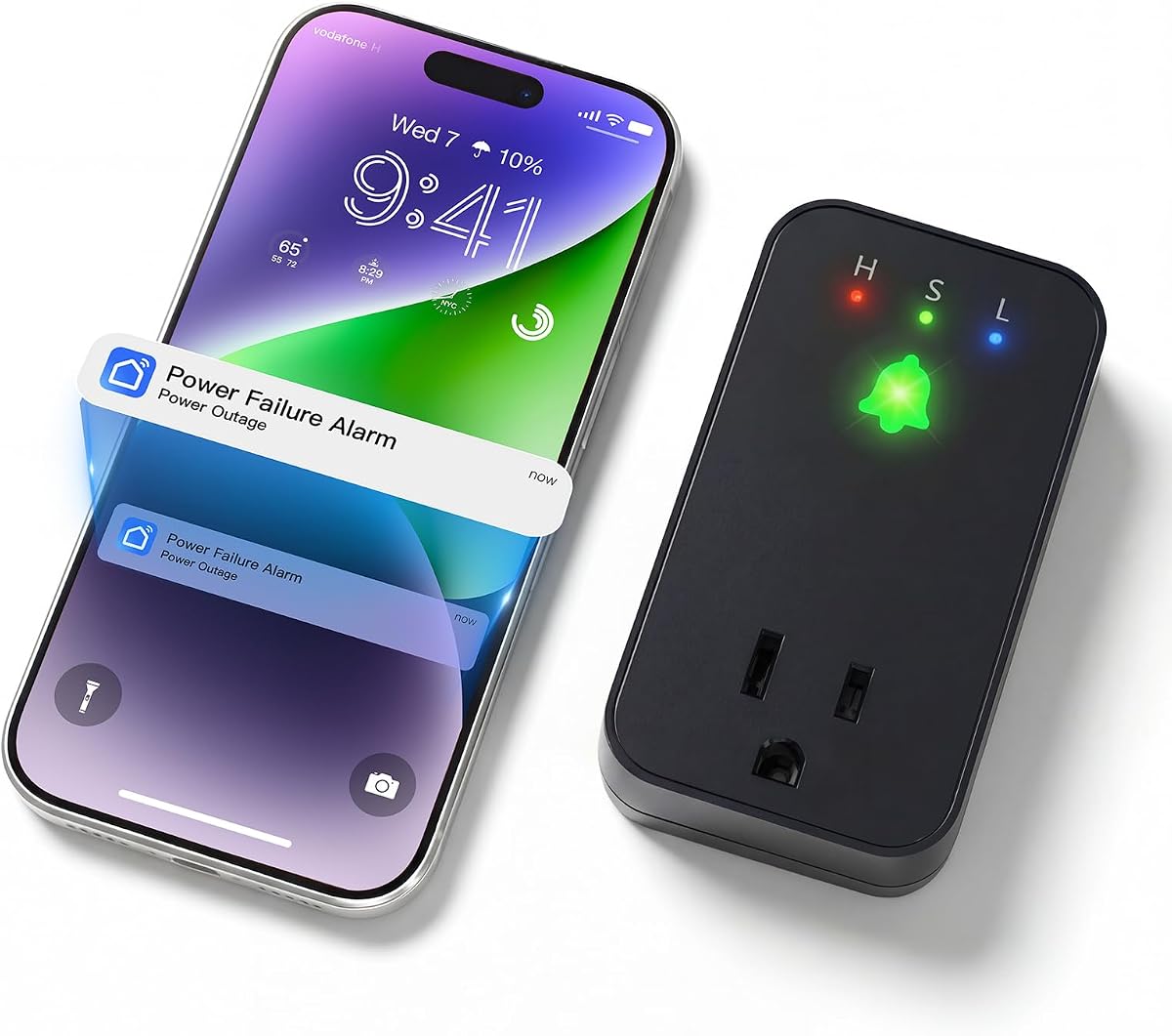



The Risinglink WiFi Power Outage Alarm Detector is the most complete remote-alert option in this guide, with a 4.4 rating and a feature set designed for people who want to know about outages without depending solely on a phone app. It sends SMS text messages, email alerts, and audible notifications for both power loss and power restoration.
We may earn a commission when you buy through this link, at no additional cost to you.
Its standout advantage is the inclusion of direct SMS and email notifications without recurring fees or a required smart-home platform. The device can alert up to two phone numbers and four email addresses, allowing household members, caregivers, or property managers to receive the same warning. It also identifies low-battery and device-offline conditions, adding useful context beyond a simple outage message.
The trade-off is that it works only with a 2.4GHz WiFi network, so homes with a 5GHz-only router may need to enable or add 2.4GHz service. Its integrated 85dB alarm is quieter than the 110dB sirens offered by many competing models, although it can still provide a meaningful local warning and is designed to operate even when WiFi is unavailable.
This is the strongest recommendation for users who prioritize dependable, direct communication, multiple recipients, and long-term monitoring without subscription alerts. It is particularly useful for monitoring a freezer, sump pump, aquarium, or other important circuit while away from home.
Direct SMS and email support distinguishes this model from app-only competitors. Because alerts do not depend on an optional paid messaging service, the notification path is simpler and more appropriate for critical household monitoring.
Supporting two phone numbers and four email addresses lets several people follow the same location. That is useful for shared homes, rentals, or anyone who wants a second person to respond while the primary user is unavailable.
We may earn a commission when you buy through this link, at no additional cost to you.
The Smart Life WiFi Failure Alarm combines a 4.3 rating with free app notifications and a loud 110dB local siren. It connects with the Smart Life or Tuya app, making it a practical choice for users already comfortable with the shared smart-home ecosystem and comfortable relying on app push alerts as their remote notification method.
We may earn a commission when you buy through this link, at no additional cost to you.
The device supports three volume levels and can remain alarming for as long as 12 hours when fully charged. Its built-in battery removes the need for routine battery replacement, while the extended socket lets it share the outlet with another appliance. These are useful features in a kitchen, basement, workshop, or utility room.
Its important limitation is that the free remote alerts are app notifications only. The product information states that additional SMS and email settings within the app require a subscription, which may not appeal to someone seeking a completely fee-free direct-messaging system. It also requires 2.4GHz WiFi rather than 5GHz-only connectivity.
The model is best for someone who wants an inexpensive, loud alarm and convenient smartphone notifications without needing to pay for extra messaging channels. It should be paired with reliable phone and router arrangements if the purpose is to protect equipment in another building or during a prolonged outage.
Smart Life and Tuya app support makes this alarm straightforward for users of those platforms. Free push notifications provide remote awareness without requiring separate SMS or email subscriptions.
The added outlet face allows the monitored appliance to remain connected. That design is especially convenient in outlets where a bulky plug would otherwise make the receptacle difficult to use.
We may earn a commission when you buy through this link, at no additional cost to you.
The Smart Freezer WiFi Alarm carries a 4.4 rating and is specifically positioned for monitoring freezers, refrigerators, sump pumps, aquariums, and other powered equipment. It uses the Smart Life or Tuya app for remote notifications and adds a high-volume local alarm for people who are near the device when power fails.
We may earn a commission when you buy through this link, at no additional cost to you.
Its 110dB buzzer includes three volume levels, allowing users to select an appropriate level for a kitchen, bedroom, basement, or utility area. A built-in battery can sustain the alarm for up to 12 hours, and the alarm releases automatically when power returns. The extended socket helps preserve access to the outlet.
As with other app-based products in this category, free notifications are limited to the app, while SMS and email settings require a subscription. It also supports 2.4GHz WiFi only. Buyers who require guaranteed direct texts or emails should not mistake the subscription-backed messaging options for free included features.
This alarm is a good fit for a household that wants loud on-site warning and convenient app alerts, especially around a freezer or sump pump. It is less suitable for users who need communication independent of a phone, internet connection, or smart-home app.
The product information highlights freezers, refrigerators, aquariums, and sump pumps as key monitoring applications. Pairing the alarm with the equipment's outlet allows users to respond before a temporary power interruption causes a larger loss.
A 12-hour backup-alert window gives household members time to investigate, move sensitive food, or check a pump. Three volume levels provide flexibility for different noise conditions and times of day.
We may earn a commission when you buy through this link, at no additional cost to you.
The Remote-Cancel WiFi Outage Alarm differentiates itself with app-based control over a local alert. Its 4.1 rating reflects a useful feature set, particularly the ability to cancel a prolonged siren remotely, customize alert timing, and select among three alarm sounds.
We may earn a commission when you buy through this link, at no additional cost to you.
Remote cancellation can reduce unnecessary disturbance for children, older adults, or pets when the alarm continues after an adult has assessed the situation. The device also offers three volume levels, 110dB maximum output, and two expandable sockets that make it easier to connect more than one appliance.
The backup alarm lasts up to 10 hours, slightly less than the 12-hour figure listed for several alternatives. Free remote alerts are app notifications, while direct SMS and email options require a subscription. The alarm also remains dependent on 2.4GHz WiFi for connected functions.
This is the most suitable choice when remote siren control is the main reason you want a smart outage alarm. Users prioritizing a longer backup-alert period, direct messaging, or a higher customer rating may find another option better aligned with their needs.
The ability to stop the local alert from the app is unusual within this group. It helps households avoid a prolonged siren after someone has already confirmed that the outage can be managed.
Two expandable sockets improve outlet utility. Multiple monitored devices can be supported without crowding the wall or requiring a separate multi-outlet accessory.
We may earn a commission when you buy through this link, at no additional cost to you.
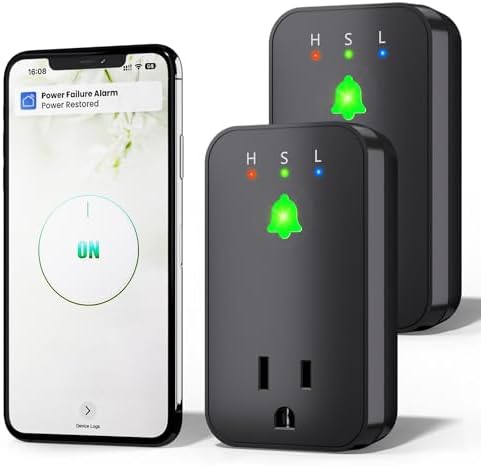
The Two-Pack WiFi Failure Alarm has a 4.3 rating and includes two individual alarm units, making it convenient for monitoring separate areas with one purchase. Common combinations include a kitchen freezer and basement sump pump, or separate units inside a home and garage.
We may earn a commission when you buy through this link, at no additional cost to you.
Each unit supports 2.4GHz WiFi, works with the Smart Life or Tuya app, provides free app notifications, and uses a 110dB siren with three volume levels. The built-in battery supports up to 12 hours of alerting, and the extended socket makes the unit less disruptive in everyday use.
The pack does not change the messaging structure: free remote notifications are app-based, while SMS and email require a subscription. Both locations also need compatible WiFi coverage, and the two units may need individual placement and network setup even if they are managed through the same app.
This product makes the most sense for buyers who have two specific locations to monitor or want a spare unit available. For one protected appliance or one room, a single-unit alarm would be simpler and avoid purchasing capacity that is not needed.
The two-unit format lets users cover separate appliances without buying separate models. It is particularly useful for properties where a freezer and sump pump occupy different parts of the building.
Both units use the Smart Life or Tuya app approach. Users who already manage connected equipment in either ecosystem can incorporate outage monitoring without learning a separate smart-home platform.
We may earn a commission when you buy through this link, at no additional cost to you.
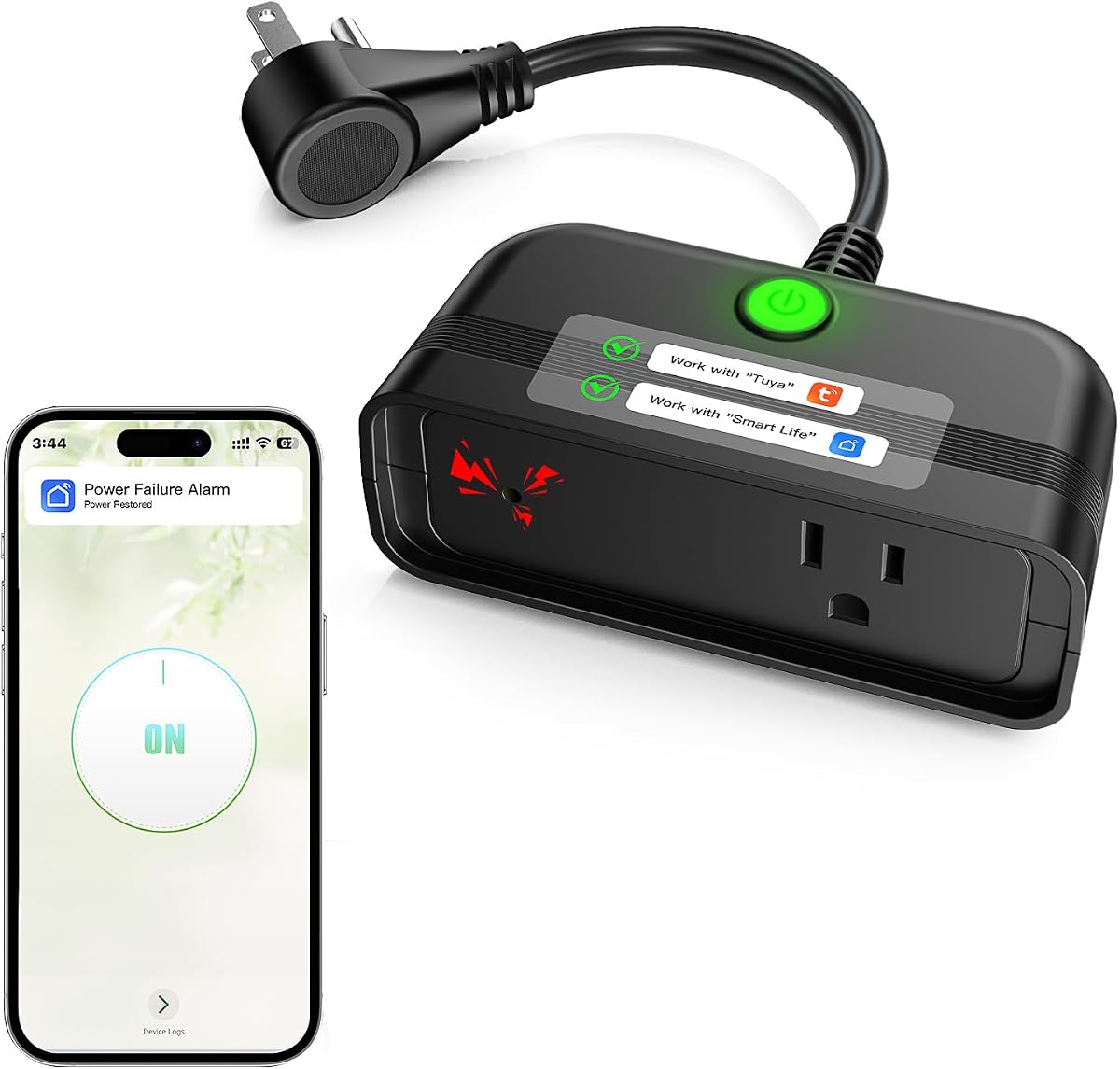
The Outdoor WiFi Outage Alarm has a 4.3 rating and is the only model in this roundup explicitly described as having a weatherproof design for outdoor standby use. It can monitor irrigation systems, birdbaths, pool equipment, courtyard lighting, camp and picnic power, and pond pumps.
We may earn a commission when you buy through this link, at no additional cost to you.
Its remote warning comes through the Smart Life or Tuya app, while a 110dB buzzer and LED indicator provide an on-site warning. A built-in rechargeable battery supports up to 12 hours of alarm operation, and a mounting hole allows the unit to hang on a wall or another suitable surface instead of being left on the ground.
Users still need reliable 2.4GHz WiFi coverage at the outdoor location, which can be more difficult than inside a home. SMS and email messaging also require a subscription. The product information does not provide detailed ingress or environmental ratings, so the stated weatherproof design should be considered within the manufacturer's intended applications.
This is the pick for households with powered equipment outside the main building envelope. Indoor users may find comparable app alarms with more detailed volume or socket specifications to be a more straightforward selection.
The weatherproof construction expands the category beyond kitchens and basements. It is intended for exterior equipment such as irrigation controllers, pond pumps, and landscape lighting where an indoor alarm cannot help.
A mounting hole helps keep the device visible and secure. This is more practical than placing it on a wet surface and makes the alarm easier to inspect during and after an outage.
We may earn a commission when you buy through this link, at no additional cost to you.
Power Pal is a compact power-monitoring smart plug with a 3.5 rating and a distinct approach to remote communication. Unlike most products here, it is presented as sending real-time text and email notifications without charging fees for those core messages.
We may earn a commission when you buy through this link, at no additional cost to you.
It can operate as a standalone outage monitor or connect with the Keep Connect mobile app and Cloud Services account. That flexibility allows users to keep the core monitoring function while also considering it as part of a connected-device setup. Its compact construction is designed to avoid taking up unnecessary receptacle space.
Its lower rating warrants careful consideration, and the supplied information does not state the local alarm volume, backup-battery duration, WiFi frequency, or outlet-expansion features. It therefore offers fewer documented local-warning details than most competitors. The product should be judged primarily on its direct notification model rather than on a specified high-volume siren.
Power Pal is the premium pick for users who value direct text and email communication without message fees and want a simple device that can stand alone. Confirming the complete technical specification before purchase is advisable if an extremely loud local siren or long battery runtime is essential.
Direct text and email support is the defining benefit. The absence of fees for core notifications makes it appealing to users who do not want a separate paid messaging plan simply to monitor power.
Power Pal can monitor a location without requiring other connected equipment. Users who want broader smart-home integration can also connect it through the Keep Connect app and associated Cloud Services account.
We may earn a commission when you buy through this link, at no additional cost to you.
The Freezer WiFi Failure Alarm has a 4.5 rating, tying for the highest rating among the products in this guide. It is a focused choice for people who want to monitor a freezer or similar powered appliance with app alerts and a loud local warning.
We may earn a commission when you buy through this link, at no additional cost to you.
The device offers a 110dB buzzer, three volume levels, and three selectable siren sounds. These options make it easier to tune the warning for different household environments. A built-in battery supports up to 12 hours of alerting, the alarm stops automatically when power returns, and an extended socket helps preserve outlet access.
Remote monitoring depends on the Smart Life or Tuya app and a 2.4GHz WiFi network. Although app notifications are free, SMS and email options require a subscription. Users who need those direct channels at no additional cost should consider the Risinglink or Power Pal instead.
For basic freezer protection, this is an appealing budget pick because it combines a strong rating with generous local alarm settings. It also works for refrigerators, aquariums, sump pumps, and other equipment when remote SMS is not essential.
Multiple siren sounds offer a practical way to distinguish an outage warning from other household noises. Users can select a sound that is noticeable to their household without relying solely on phone vibration.
A 12-hour alert duration provides meaningful coverage for an extended interruption. It is long enough to cover many common outages while the household still has time to protect food or check equipment.
We may earn a commission when you buy through this link, at no additional cost to you.
The Manual-Reset WiFi Alarm has a 4.5 rating and introduces a deliberately persistent safety design: the alarm cannot be silenced remotely, and a physical button must be held to reset it after an interruption. That requirement helps prevent an important outage warning from being dismissed casually through a phone.
We may earn a commission when you buy through this link, at no additional cost to you.
It sends free app notifications through Smart Life or Tuya and provides a built-in 110dB siren, bright flashing red LED, and three volume levels. The rechargeable battery supports a 12-hour continuous alarm at full power, while an on-device cancel button offers a manual way to stop the sound if someone is present.
The trade-off is reduced convenience compared with products that can be controlled entirely from an app. The manual reset may also feel unnecessary to someone who wants the device to resume normal operation automatically after power returns. Compatible 2.4GHz WiFi is still required for app notifications.
This model suits people who want an outage to demand deliberate attention rather than disappear from a notification tray. Its high rating, bright visual warning, and 12-hour alarm make it a strong option for homes where a freezer or sump pump failure must not be overlooked.
Requiring a person to hold the physical control before the device returns to its normal state prevents accidental or remote dismissal. This is useful when the consequence of ignoring an outage could be costly.
A flashing red LED supports the 110dB siren and gives people another way to notice a problem. The visual signal is especially useful when a phone is muted or the alarm is beyond hearing range.
We may earn a commission when you buy through this link, at no additional cost to you.
The Smart Life 15A Alarm has a 3.9 rating and stands out for its stated support for currents up to 15 amps. That makes it a potentially useful monitor for higher-power appliances such as furnaces, refrigerators, freezers, aquariums, sump pumps, ovens, automatic feeders, oxygen concentrators, and dehumidifiers.
We may earn a commission when you buy through this link, at no additional cost to you.
The device includes a display that monitors voltage in real time and sends Smart Life app notifications. When an outage occurs, it triggers a 110dB alert and LED flash for 60 seconds. Its rechargeable lithium battery then supports a continuing beep reminder every minute for up to 12 hours.
The app depends on 2.4GHz WiFi and, as the product information notes, a router with uninterruptible power supply is recommended if phone notifications must continue during an outage. Its 3.9 rating is also lower than most alternatives, so buyers should consider the 15A claim and display carefully against their needs.
This alarm is best for users who need to monitor higher-current equipment and value visible voltage information. Those wanting the highest customer rating or a longer full-volume alarm window may prefer one of the other models in the guide.
The stated 15A support expands the range of compatible appliances compared with many compact alarm plugs. It is worth confirming the electrical requirements of the connected equipment before installation.
The built-in screen gives the user an immediate electrical-status readout. It adds a useful visual element beyond app notifications and helps confirm whether the monitored outlet is receiving power.
We may earn a commission when you buy through this link, at no additional cost to you.
The right outage notification device depends on how you want to be contacted, what equipment you need to protect, how loud the local warning should be, and whether the installation is indoors or outdoors. These factors also determine whether an app-only model is sufficient or direct SMS and email support is worth prioritizing.
App push notifications are convenient and can be free, but they depend on the phone being connected to the internet, the relevant app remaining active, and notification settings allowing the message through. Direct SMS and email provide alternative channels that may be more noticeable or easier to share. The Risinglink model supports direct SMS and email without a required subscription, while Power Pal also emphasizes fee-free text and email. By contrast, most Smart Life and Tuya products in this list provide free app alerts and require a subscription for additional text or email settings.
A local siren is only useful after an outage has already disabled the wall power, so battery duration matters. Most products in this guide offer approximately 12 hours of backup alerting, while the Remote-Cancel model lists up to 10 hours and the Risinglink focuses on a pre-installed battery designed to last over five years under typical use. Compare not only the length of the outage warning but also what the siren does after power returns. Some models release automatically, while others require a physical acknowledgment.
Most models offer a local buzzer rated up to 110dB, whereas the Risinglink device lists an 85dB alarm. Higher output can be useful in a garage, basement, or workshop, but an adjustable volume is equally important in a bedroom or near a sleeping area. Three selectable sounds and multiple volume levels offer more flexibility than a single fixed alarm pattern, making the Freezer WiFi Failure Alarm and Manual-Reset WiFi Alarm particularly adaptable.
Nearly every WiFi model in this guide supports only the 2.4GHz band. That means a router must provide 2.4GHz service, and the phone or network must be configured to join that band during setup. Most app-based products use either Smart Life or Tuya, while Power Pal can work as a standalone monitor or connect through the Keep Connect app. Confirm app availability and account requirements before installation, especially if you already maintain a particular smart-home ecosystem.
Some alarms add an extended socket, allowing a second appliance to share the outlet. The Remote-Cancel model goes further with two expandable sockets, while the Smart Life 15A Alarm states support for up to 15 amps. Consider the physical outlet layout, plug clearance, amperage, and the type of equipment involved. A compact design may be better in a crowded kitchen, whereas a high-capacity model may be more appropriate for a furnace, sump pump, or other higher-power device.
Most units are designed for indoor receptacles, including kitchens, basements, garages, and utility rooms. The Outdoor WiFi Outage Alarm is explicitly described as weatherproof and is intended for exterior equipment such as irrigation systems, pond pumps, courtyard lighting, and camp or picnic power. Outdoor placement introduces additional considerations: the unit still needs compatible WiFi coverage, and the listed product information should be reviewed carefully before exposing any device to conditions outside its stated use.
A device that supports multiple phone numbers or email addresses is more useful when someone other than the account holder must respond. Risinglink supports up to two phone numbers and four email addresses. App-only devices may still allow alerts to be viewed by additional household members through shared access, but that depends on the app's account and sharing controls. Decide whether alerts need to reach a partner, caregiver, tenant, property manager, or neighbor before selecting a model.
A reliable device should reveal more than a power-loss event. Risinglink includes notifications for low battery and device offline status, while the Manual-Reset model deliberately requires a physical button press after an interruption. These approaches address opposite needs: automatic recovery is convenient, whereas a mandatory reset ensures someone consciously notices the event. Think about which behavior reduces the chance of a missed outage in your household.
Begin by identifying the outlet and the exact equipment you want to monitor. The alarm and the protected appliance should be on the circuit you care about, and you should leave enough clearance around the unit for its socket, buttons, and indicators. Before plugging it in, confirm that the router provides 2.4GHz WiFi if the model is app-based. Download the correct Smart Life, Tuya, or Keep Connect app as directed by the applicable product instructions, then complete account registration before connecting the device.
Follow the app's pairing process and test the system before relying on it. Unplug the monitored circuit briefly after setup, within any limits recommended by the manufacturer, to confirm that the phone receives an outage notification and that the local alarm activates. Then restore power and verify the restoration message, automatic alarm release, or required reset procedure. Users who need SMS or email should also confirm that the selected notification service is active, that all recipient addresses are entered correctly, and that any applicable subscription is properly configured.
For long-term care, keep the outlet and alarm dry, clean, and unobstructed, and periodically check that the device remains connected to WiFi. Recharge or replace the internal battery when the product indicates a low-battery condition, following the manufacturer's instructions. Test the backup siren and remote alerts on a regular schedule, review app permissions and recipient lists, and confirm that the router remains powered during outages if uninterrupted phone notifications are important. For equipment such as freezers, sump pumps, aquariums, and medical devices, treat the alarm as one layer of protection rather than a replacement for safe operating procedures or professional guidance.
A router backup can preserve internet access during a short outage, but it does not necessarily monitor whether the power has returned or alert every monitored circuit. An outlet alarm adds a local siren, remote notification, and power-restoration signal. It is particularly useful when you want to check a freezer, sump pump, aquarium, or other equipment even if the internet connection is also unavailable.
Most of the WiFi models listed support 2.4GHz WiFi only, and the product information specifically warns that 5GHz-only networks are not supported. If your router combines 2.4GHz and 5GHz under one name, you may be able to connect the device during setup by temporarily joining the 2.4GHz band. Confirm the router's separate network settings before purchasing.
App notifications can be highly effective when the phone has internet access, the app remains active, and notification permissions are enabled. Direct SMS and email create additional communication paths, which can be valuable when an outage also affects the router or internet service. Buyers who want direct messages without an optional subscription should focus on the Risinglink and Power Pal models.
A higher decibel rating generally indicates a louder local warning, which may be easier to hear in a basement, garage, workshop, or larger home. It can also be unnecessarily disruptive in a bedroom or quiet living space. The best approach is to compare maximum output with available volume controls and the location where the device will be installed.
A device can only recognize the status of the circuit and outlet where it is connected, so placing it near a refrigerator does not directly monitor a separate appliance in another room. Several devices may be needed for separate circuits. Some models add extended or expandable sockets, but those sockets still belong to the same monitored circuit.
Yes, the alarm must be connected to the outlet or circuit whose power status it needs to monitor. If that outlet has an extended socket, the protected appliance can often be plugged into the alarm itself. Otherwise, the alarm monitors the same circuit while the appliance remains connected through another receptacle on that circuit.
First verify that the phone is connected to mobile data or another internet source because the router may also have lost power. Check that app notifications are enabled, the account is still signed in, and the device shows as connected. Some alarm models also provide direct text or email channels, while a local siren can warn people already in the building.
Testing every few months is a reasonable routine, although the exact interval depends on the device and how critical the monitored equipment is. Test both the remote notification and local siren, then confirm that the alarm returns to normal operation. Periodic tests also reveal depleted backup batteries, changed WiFi settings, disabled permissions, or recipient lists that need updating.
The Risinglink WiFi Power Outage Alarm is the strongest all-around recommendation because it combines direct SMS, email, restoration alerts, a local siren, multi-recipient support, and battery and offline notifications without requiring a third-party platform. The Manual-Reset WiFi Alarm stands out for its 4.5 rating, bright visual warning, 12-hour alarm, and insistence on physical acknowledgment. Power Pal offers a premium alternative centered on fee-free text and email communication.
For buyers focused on free app alerts and loud local warnings, the Freezer WiFi Failure Alarm is another balanced option. The Outdoor WiFi Outage Alarm serves exposed exterior equipment, while the two-pack provides convenient coverage for two locations. Before choosing, prioritize the notification channel you will actually notice, the amount of local alarm coverage needed, and whether your WiFi network and protected appliances match the device's specifications.
Product features, ratings, availability, and pricing can change, so readers should check the current listing and seller information before purchasing. Comparing the alarm's backup behavior, recipient options, outlet design, and intended environment is more useful than choosing on appearance alone. With those details confirmed, the right power outage notification device can provide timely warning when the loss of power matters most.