
MSI PRO B550M-P WIFI6E
4.7Editor score
EZ Debug LED
Compact mATX layout
Wi-Fi 6E included
Discover the best Motherboards with Debug LED, comparing diagnostics, sockets, connectivity, expansion, cooling, and features for modern high-performance
A motherboard with a debug LED can shorten the path between a failed boot and a useful diagnosis by displaying the stage at which startup stops. These indicators are especially valuable during first-time PC builds, memory troubleshooting, and system upgrades, where guessing which component is responsible can consume far more time than checking one labeled light.
This guide compares ten relevant products, including seven full motherboards and three add-on diagnostic cards with LED indicators. We evaluated the supplied details for processor support, memory standards, expansion, networking, cooling, power delivery, diagnostic features, form factor, and practical connectivity rather than treating every similarly named board as interchangeable.
Each review explains where the product fits in a modern build and calls out the trade-offs suggested by its specifications. Ratings and technical details reflect the supplied product information, while availability and pricing can change over time, so readers should confirm current listings and exact board revisions before purchasing.
4.7Editor score

4.5Editor score
4.6Editor score
This side-by-side comparison highlights each product's platform, diagnostic approach, expansion, and networking, while separating complete motherboards from add-on diagnostic cards.


The MSI PRO B550M-P WIFI6E combines an explicit EZ Debug LED with a compact mATX design and broad compatibility with several generations of Ryzen processors. Its supplied rating of 4.7 is the highest among the ten products, making it an appealing recommendation for builders who want straightforward diagnostics without moving to the newest platform.
We may earn a commission when you buy through this link, at no additional cost to you.
The board supports AMD Ryzen 5000, 5000 G, 4000 G, and 3000 series processors, as well as DDR4 memory up to 4400+ MT/s with overclocking. PCIe 4.0 expansion and a Lightning Gen4 x4 M.2 slot provide a useful baseline for modern graphics cards and fast storage, while HDMI and DisplayPort outputs provide display options for integrated graphics.
Its most relevant feature for this guide is the EZ Debug LED, which gives a visible startup reference without requiring the extra diagnostic hardware considered later in the list. The tradeoff is platform age: AM4 and DDR4 are no longer the newest standards, and AM5-oriented builders cannot reuse the same memory or processor. The mATX format also requires case clearance checks.
This is a strong match for a compact AM4 gaming or productivity build where troubleshooting visibility matters. It also suits builders reusing a supported Ryzen processor and DDR4 kit. For anyone starting from scratch in 2026 and prioritizing long-term socket and memory support, an AM5 or LGA 1700 board may be a more forward-looking choice.
The EZ Debug LED removes much of the guesswork from a failed POST by identifying the startup stage. This is particularly useful in a new compact build, where limited space can make physical inspection and cable tracing more difficult.
Its mATX layout can simplify airflow and case selection, while Wi-Fi 6E and Bluetooth 5.2 reduce the need for separate adapters. Integrated wireless is particularly convenient when the finished system will not have easy access to a wired network connection.
We may earn a commission when you buy through this link, at no additional cost to you.
The ASUS TUF Gaming Z790-Plus WiFi is a well-rounded ATX board for Intel builders, combining a 4.5 rating with a mature power-delivery design, extensive cooling, four M.2 positions, and fast wired and wireless networking. It fits particularly well for a gaming system that needs storage flexibility and modern peripheral connections.
We may earn a commission when you buy through this link, at no additional cost to you.
Its LGA 1700 socket supports 12th, 13th, and 14th generation Intel Core processors, with DDR5 memory and PCIe 5.0 capability. A 16+1 DrMOS arrangement, ProCool sockets, military-grade TUF components, and Digi+ VRM form the power foundation, while VRM, PCH, and M.2 heatsinks support sustained operation.
Storage and connectivity are the standout areas. Four M.2 or NVMe SSD positions allow a more elaborate storage arrangement than many compact boards, and the front-panel USB 3.2 Gen 2 Type-C header, USB Gen 2×2 Type-C, and Thunderbolt 4 header cover both current and emerging workflows. Some diagnostic functionality is less explicitly highlighted in the supplied details than the EZ Debug LED named for the MSI board.
Choose this board when you want Intel compatibility, extensive expansion, and a broad selection of fast ports. It is less suitable when case space is limited or when you want the newest possible processor platform. A system with several NVMe drives, a high-speed external enclosure, and a demanding gaming workload is an especially good match.
Four M.2 slots make room for a boot drive, game library, active project drive, and a dedicated cache or scratch disk. Cooling provisions around the storage area also help address the heat generated by sustained high-speed transfers.
Thunderbolt 4 and front-panel USB Type-C improve compatibility with high-speed storage, docks, and displays. The 2.5Gb LAN and Wi-Fi 6 provide two practical ways to connect to a fast network without relying on a single transport method.
We may earn a commission when you buy through this link, at no additional cost to you.
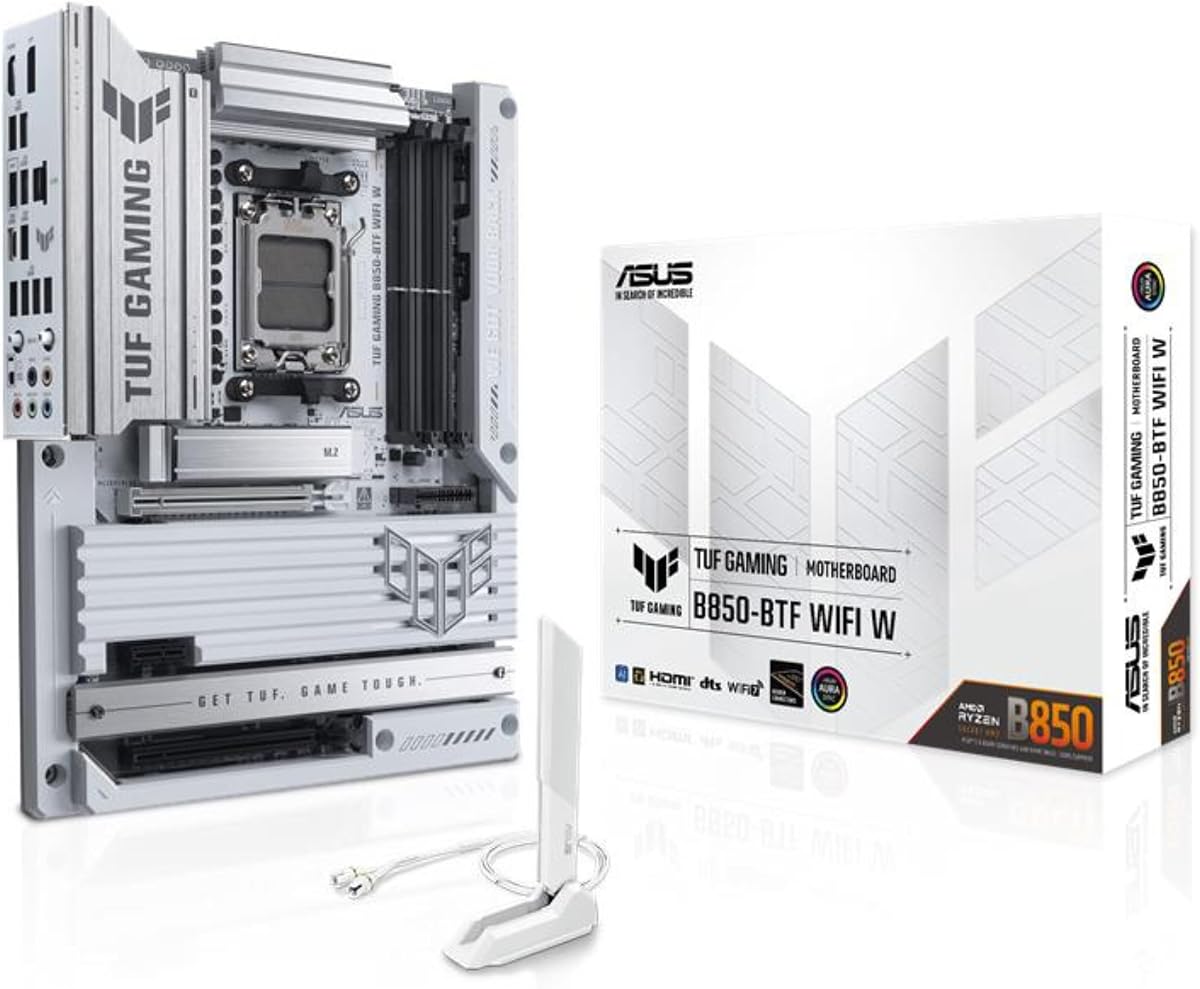
The ASUS TUF Gaming B850-BTF WiFi W is a premium AM5 ATX board distinguished by its hidden-connector design and support for a high-power graphics card connection. Its 4.6 rating reflects a strong feature set that also includes Wi-Fi 7, 2.5Gb LAN, DDR5, and three M.2 positions.
We may earn a commission when you buy through this link, at no additional cost to you.
The board supports Ryzen 9000, 8000, and 7000 series desktop processors through AM5. Its 14+2+1 80A DrMOS stages, eight-layer PCB, 8+8-pin ProCool connectors, alloy chokes, and durable capacitors form a robust power-delivery system intended for stable operation with demanding multi-core processors.
Its most distinctive feature is the hidden-connector layout, which moves internal connections out of sight and can make a finished system look cleaner with fewer exposed cables. The graphics card high-power slot can deliver up to 600 watts through the motherboard, potentially reducing the cable burden associated with some high-end graphics cards.
This board is best for a polished AMD build where appearance, high-end power delivery, and modern connectivity matter more than a low-cost platform. It is also a strong candidate for creators who want a high-bandwidth GPU and fast networking. Builders should verify physical dimensions, case clearance, and exact connector arrangement against their chosen components.
Concealing connectors behind the board tray or within dedicated routing areas reduces visual clutter without removing essential access. That makes the board particularly attractive to builders who plan to use a side-panel window and want the interior to look orderly.
The motherboard's high-power graphics connection can route substantial power directly to compatible cards. Buyers should still pair it with a suitably capable power supply and check the graphics card manufacturer's installation guidance.
We may earn a commission when you buy through this link, at no additional cost to you.
The MSI MAG X870 Tomahawk WiFi emphasizes speed, with a built-in USB 4 port, 5Gbps LAN, Wi-Fi 7, and Bluetooth 5.4. Its 4.3 rating is the lowest among the full motherboards in the list, but the supplied specifications position it as a modern AM5 option for users who value network and peripheral throughput.
We may earn a commission when you buy through this link, at no additional cost to you.
Support for Ryzen 9000, 8000, and 7000 series processors gives buyers several AM5 processor families to consider. DDR5 and PCIe 5.0 form the core platform, while the M.2 Gen5 designation signals support for current high-speed storage. HDMI and DisplayPort outputs broaden the display options available through integrated graphics.
The extended PWM heatsink and enhanced circuit design are intended to help high-end processors maintain performance. Audio Boost 5 adds isolated audio and a dedicated audio processor, while 5Gbps LAN offers a notable step above 2.5Gb networking for compatible networks and storage devices.
This board makes the most sense for an AM5 system centered on fast external devices, high-speed networking, or a current-generation graphics card. The 4.3 rating warrants attention when comparing it with more highly rated alternatives, and buyers should confirm that the specific BIOS and component configuration meet their needs.
A built-in USB 4 port can benefit compatible docks, external enclosures, and other demanding peripherals. The benefit is greatest when paired with equally fast devices and appropriate cables rather than conventional USB accessories.
5Gbps Ethernet is useful for users with compatible network infrastructure, NAS systems, or very fast local storage. Wi-Fi 7 provides a convenient wireless alternative, though real-world performance depends on the router, client device, and environment.
We may earn a commission when you buy through this link, at no additional cost to you.
The GIGABYTE Z390 AORUS PRO Wi-Fi is a legacy-focused Intel board with a 4.5 rating and support for 9th and 8th generation Core processors. It remains most compelling for an existing LGA1151 system or a deliberate build using previously owned components, not for a new platform intended to span multiple future processor generations.
We may earn a commission when you buy through this link, at no additional cost to you.
Its dual-channel non-ECC unbuffered DDR4 configuration includes four DIMM slots, and Intel Optane memory readiness provides an additional storage-related capability. The 12+1 digital VRM design with DrMOS, multi-cut heatsinks, and a heat pipe form a solid foundation for the supported processor generations.
Networking is unusually convenient for its era, with onboard Intel CNVi 802.11ac 2×2 wave 2 Wi-Fi, Bluetooth 5, and Intel Gigabit LAN with cFosSpeed. RGB Fusion supports addressable LEDs and RGB strips, while Smart Fan 5 uses multiple temperature sensors and hybrid fan headers.
Choose this board when preserving an 8th or 9th generation Intel system is the priority and suitable components are already available. For a new build, its older platform and DDR4 memory are difficult to justify against current alternatives. The board's appeal lies in extending a functioning system rather than preparing for a long upgrade path.
A Z390 board can give a compatible 8th or 9th generation Core system newer connectivity, storage, or power features without changing the processor and memory. This is most useful when those core components are already installed and known to work.
Onboard Wi-Fi and Bluetooth remove the need to occupy a rear USB port with an adapter. The antenna hardware must still be installed correctly, and network performance will depend on the included radio, router, and surrounding conditions.
We may earn a commission when you buy through this link, at no additional cost to you.
The GIGABYTE B850 AORUS Elite WIFI7 combines current AM5 support with a 14+2+2 power design, Wi-Fi 7, 2.5GbE, and three M.2 slots. Its 4.4 rating places it firmly in the middle of the group and suggests a balanced choice for builders who want modern features without maximizing every specification.
We may earn a commission when you buy through this link, at no additional cost to you.
The board supports Ryzen 9000, 8000, and 7000 series processors, with four DDR5 DIMM slots for mainstream memory configurations. PCIe 5.0 and three M.2 connectors provide enough room for a boot drive, a game library, and an additional high-speed storage device in many gaming builds.
Thermal provisions include a VRM heatsink and M.2 Thermal Guard, while EZ-Latch simplifies retention and removal for compatible M.2 drives. USB-C and Wi-Fi 7 improve everyday peripheral and network readiness, and the 2.5GbE connection offers a practical middle ground between 1Gb and 5Gb networking.
This motherboard works well for a new AM5 gaming PC that needs modern storage and wireless connectivity. It is not the strongest choice for a workstation with numerous NVMe drives, since the ASUS Z790-Plus offers four M.2 slots. It may also be less visually distinctive than a hidden-connector design.
The combination of current processor support, DDR5, PCIe 5.0, and three M.2 slots covers the most common requirements of a modern gaming system. It provides a practical foundation without requiring every premium connector or storage position.
Wi-Fi 7 and 2.5GbE let the system use either a modern wireless connection or a fast wired link. Having both is useful when a room's network layout makes one method more convenient or reliable than the other.
We may earn a commission when you buy through this link, at no additional cost to you.
The GIGABYTE B650 AORUS Elite AX is an established AM5 ATX option with a 4.4 rating, a 14+2+1 power phase, and broad compatibility with Ryzen 9000, 8000, and 7000 series processors. It offers a modern CPU and memory platform without requiring the newest chipset generation.
We may earn a commission when you buy through this link, at no additional cost to you.
Its twin 14+2+1 phases use 70A power stages on an eight-layer, two-copper PCB. The thermal design includes a 6mm heatpipe, fully covered MOSFET heatsinks, and M.2 Thermal Guard, while PCIe Ultra Durable Armor adds structural protection for expansion slots.
Storage and peripheral connectivity are the major strengths. PCIe 5.0 and a PCIe 5.0 NVMe x4 M.2 position support high-speed drives, while front and rear USB-C expands compatibility with modern accessories. Wi-Fi 6E and 2.5GbE cover common networking needs, and EZ-Latch, Q-Flash, and RGB Fusion improve installation and customization.
This board is a sensible choice for a mainstream AM4-to-AM5-style platform refresh, a new Ryzen gaming system, or a builder who values established support over the newest ancillary features. It is less compelling for a workstation that needs more than two M.2 positions or for users specifically seeking the newest USB and network standards.
The 70A stages, multilayer PCB, and covered MOSFET heatsinks form a substantial power and cooling foundation. These details are especially relevant when the system will run a high-power Ryzen processor under sustained multi-threaded workloads.
A PCIe 5.0 NVMe x4 M.2 slot supports compatible high-speed drives, and M.2 Thermal Guard helps manage heat. EZ-Latch can also make drive installation and removal more convenient than a tiny screw in a crowded case.
We may earn a commission when you buy through this link, at no additional cost to you.
The Jadeshay TL631 Pro is not a complete motherboard; it is an add-on diagnostic card for motherboards with PCI, PCI-E, mini PCI-E, or LPC slots. Its 3.3 rating is the lowest in the list, but the multi-channel LED display makes it relevant to anyone who wants portable startup diagnostics across several systems.
We may earn a commission when you buy through this link, at no additional cost to you.
The card's indicators monitor critical areas including the power supply, motherboard, CPU, memory, graphics card, and hard disk. That broad channel coverage gives a visual sequence of POST activity and can reveal where a startup sequence stops. An intelligent power module recognition system is included to streamline initial interpretation.
Its compatibility is the main advantage over a diagnostic feature integrated into one particular board. The supplied details state that it works with major brands including ASUS, GIGABYTE, and MSI, and with desktop or laptop motherboards that expose a supported slot. That flexibility can make it useful for a repair bench or a builder maintaining multiple computers.
The main limitation is the need for a compatible, accessible expansion slot. A system with limited internal space may be difficult to test, and some compact or modern designs do not provide the legacy slot the card requires. Choose it as a diagnostic accessory rather than as a motherboard, and confirm slot type and clearance before purchasing.
Because the card is not tied to a processor socket or chipset, it can be moved between compatible systems. That makes it useful for technicians, enthusiasts with several PCs, or anyone diagnosing whether a problem follows a component or remains with a particular motherboard.
The separate LED channels provide a visual map of the POST sequence. Comparing the last active channel with a known-good boot can help narrow the search to areas such as memory, graphics, or storage before replacing components.
We may earn a commission when you buy through this link, at no additional cost to you.
The TL611 Pro Mainboard Debug Card is an add-on tester distinguished from the other diagnostic card by its four-digit POST display. Its 3.5 rating remains modest, but the numeric readout and individual LED indicators can provide more specific information to someone comfortable interpreting traditional POST codes.
We may earn a commission when you buy through this link, at no additional cost to you.
The card supports PCI-E, mini PCI-E, and LPC connections and is listed as compatible with PCI slots. Automatic identification of power modules is intended to reduce the setup effort, while multiple channels detect areas such as the power supply, CPU, and memory.
The four-digit display makes this tool useful when a user wants to read a coded startup value and compare it with board documentation. The individual LEDs provide a second visual reference, allowing a technician to combine a code with the currently active stage rather than relying on a display alone.
This is most useful for a repair bench, an enthusiast with several compatible systems, or a technician who already understands POST codes. It is not an alternative to choosing a motherboard. Compatibility with the target system, the available slot, and the availability of documentation for the displayed codes should all be checked first.
A four-digit display offers a compact alternative to observing only a row of lights. The information is most valuable when the user can consult the relevant board or card documentation and compare the displayed value with a known-good startup sequence.
The card's support for several slot types lets a technician move it between compatible desktop and laptop motherboards. As with any add-on tester, it should be installed only when the system is powered off and handled according to the card's instructions.
We may earn a commission when you buy through this link, at no additional cost to you.
The ASUS ROG Strix X870E-E is the most feature-dense full motherboard in the list, with a 4.4 rating, five M.2 positions, an 18+2+2 power solution, extensive USB4 connectivity, Wi-Fi 7, and 5Gb Ethernet. It is aimed at builders who want advanced controls and extensive expansion rather than a minimal mainstream configuration.
We may earn a commission when you buy through this link, at no additional cost to you.
The AM5 socket supports Ryzen 9000, 8000, and 7000 series processors, while DDR5 AEMP is listed among the memory-related features. The 18+2+2 power solution is rated at 110A per stage and uses dual ProCool II connectors, alloy chokes, and durable capacitors to support demanding multi-core processors.
Five M.2 slots include three onboard PCIe 5.0 positions and two PCIe 4.0 positions, all with substantial cooling. Dual USB4 Type-C ports, a front USB 20Gbps Type-C connector, a 10Gbps port with Power Delivery 3.0, and numerous additional 10Gbps ports make peripheral planning unusually flexible.
Its diagnostic and DIY tools are especially relevant to this guide. Q-Code and Q-LED provide visible and coded troubleshooting references, while Q-Release Slim, M.2 Q-Latch, Q-Slide, BIOS FlashBack, a start button, and a Clear CMOS button simplify common maintenance tasks. Choose it for a high-end AMD system that will take advantage of its storage, networking, cooling, and tuning options.
Q-Code and Q-LED support troubleshooting directly on the motherboard, reducing the need for a separate POST card in many situations. The Clear CMOS button can also help reset settings when memory training, clock configuration, or firmware changes prevent a normal startup.
Three PCIe 5.0 and two PCIe 4.0 M.2 slots make this board well suited to large game libraries, active media, scratch storage, and multi-drive systems. Cooling around all five positions matters when several fast SSDs operate at the same time.
Dynamic OC Switcher, Core Flex, asynchronous clock, PBO Enhancement, AI Overclocking, AI Cooling II, and AI Networking give advanced users a broad control set. These tools are valuable when tuning is a goal, but they also make the board less necessary for a simple office system.
We may earn a commission when you buy through this link, at no additional cost to you.
The right board should fit the processor, memory, case, expansion needs, and diagnostic habits of its owner. Use the following factors to narrow the field before comparing ports, wireless support, and troubleshooting features.
Choose the board first, then purchase compatible memory. Mixing generations can waste time and money.
Prefer diagnostics that are clearly labeled, documented, and visible in your case.
Do not select a form factor based only on the number of letters in its name; verify physical clearance.
Plan around the drives and expansion cards you will actually use, not the largest possible count.
Match cooling and power delivery to the processor's workload rather than relying on phase counts alone.
Match the board's network hardware to your router, switch, and storage rather than selecting the highest label.
Verify the physical header and port types, not just the presence of the word USB.
Convenience features can save more time than a minor specification advantage during routine maintenance.
Before the first power-on, identify every debug light, Q-LED, two-character code, or post-code display and consult the board manual. Install the processor, memory, storage, and graphics card according to the manual, confirm that the power supply is connected correctly, and then watch the indicators during startup. The last active stage or displayed code can narrow the problem to a subsystem, but it should be treated as a starting point rather than a definitive component failure.
If the system does not complete startup, first confirm that the power supply is switched on and that the board's power connections are fully seated. Check memory placement and compatibility, reseat the graphics card, verify that the CPU cooler is operating, and examine storage connections. Do not repeatedly change several components at once, because recording each test result makes it easier to identify the true cause.
For an external diagnostic card, power the computer down completely before inserting or removing it. Confirm the slot type, case clearance, and grounding requirements, and use the card only on a compatible motherboard. To care for the board, keep the area free of dust, maintain airflow around VRM and M.2 heatsinks, use surge protection, and update firmware only when the system is stable and the correct BIOS procedure is understood.
A debug LED usually identifies the last startup stage reached, such as CPU, memory, graphics, or storage initialization. The exact labels and order depend on the motherboard, so the board manual is essential. A stopped light identifies where troubleshooting should begin, but it does not always prove that the associated component is defective.
No. They are add-on diagnostic cards that plug into compatible PCI, PCI-E, mini PCI-E, or LPC slots. They add LED channels and, on the TL611 Pro, a four-digit POST display. They can be useful across several systems, but they require an available compatible slot and do not replace motherboard selection.
A visible diagnostic system is especially useful for first-time builders, systems with upgraded memory, and PCs being repaired outside a professional workshop. It can save time by narrowing the startup stage where a fault appears. It is less important if you already have reliable POST codes, a separate diagnostic card, or a systematic troubleshooting process.
Only if your finished system cannot use a convenient wired connection or a USB wireless adapter. Onboard Wi-Fi is cleaner and avoids occupying a rear USB port, but it does not automatically guarantee a faster or more reliable link than a good external adapter. Check your router's standard and the board's included antenna arrangement.
No. AM5 boards use DDR5, while the AM4 MSI PRO B550M-P WIFI6E uses DDR4. The LGA 1700 ASUS TUF board also uses DDR5, whereas the older LGA1151 GIGABYTE Z390 board uses DDR4. Purchase memory specifically for the motherboard's slot and platform.
The listed boards range from two M.2 positions on the MSI PRO and older GIGABYTE Z390 to three on several AM5 models and five on the ASUS ROG X870E-E. The ASUS TUF Z790-Plus provides four. Check the manual for lane sharing, cooling arrangements, and whether additional drives may require adapter or SATA connectivity.
Confirm that the memory is installed in the slots named in the manual and that the module type is supported by the board and processor. Reseat the modules, test one module at a time in the recommended slot, and verify that the memory profile or speed is appropriate. If problems continue, clear CMOS and update the BIOS when practical.
Not for every build. PCIe 5.0 is most relevant to compatible high-speed SSDs and graphics hardware, while Wi-Fi 7 requires a matching router and client environment. A system using 2.5Gb Ethernet, current Wi-Fi 6E, and one fast NVMe drive can still be highly capable. Prioritize processor, memory, storage, and power support first.
The MSI PRO B550M-P WIFI6E stands out for compact size, explicit EZ Debug LED support, and broad Ryzen compatibility, making it the Best Budget choice. The ASUS TUF Gaming Z790-Plus WiFi is the Editor's Choice for Intel builders who want DDR5, four M.2 slots, strong cooling, and fast connectivity. The ASUS TUF Gaming B850-BTF WiFi W takes the Best Premium position through its hidden-connector design, high-power graphics support, and polished AM5 feature set.
Prioritize the processor and memory platform before anything else, then confirm case size, storage count, networking, and cooling. For straightforward visible diagnostics, favor a board with a clearly documented LED system; for broader multi-system use, the Jadeshay and TL611 diagnostic cards can provide a portable alternative. A higher specification is not automatically the better fit if the extra ports, storage positions, or tuning tools will remain unused.
Finally, check the current listing, supported processor list, BIOS version, included accessories, and warranty details before ordering. Ratings can change, component availability varies, and market conditions alter what each platform costs. Comparing the current product page with this guide will help ensure that the selected board still matches both the planned system and the diagnostic workflow you value.

