
ASRock 970M PRO3
4.0Editor score
Compact MicroATX design
AMD 970 chipset
Socket AM3+ compatibility
DDR3 memory support
Compare the best Asrock AM3 Motherboard options for compatibility, expansion, storage, networking, and compact or full-size builds in this expert guide today.
The Asrock AM3 Motherboard category covers older AMD platforms that remain useful for budget builds, legacy processors, and systems with compatible DDR3 memory. A good board should match the processor, provide the required expansion and storage connections, and fit the intended case without unnecessary complexity.
We compared these ten ASRock boards by socket support, chipset capabilities, memory configuration, expansion slots, SATA connectivity, USB support, networking, audio, and case format. The list includes compact MicroATX models, full-size ATX boards, and designs aimed at different levels of expansion.
Each pick highlights a distinct practical strength, from broad processor support to USB 3.1, M.2 connectivity, multiple graphics options, or extensive legacy storage support. Ratings and specifications reflect the supplied product information, while current availability and prices should be checked before purchase.
4.0Editor score

4.2Editor score

4.3Editor score
The table below compares all ten boards by socket, chipset, memory, expansion, and storage capabilities, making it easier to identify the right ASRock AM3 motherboard for a particular processor, case, and expansion plan.




The ASRock 760GM-HDV earns the highest rating among the listed boards and stands out for broad processor compatibility. It supports Socket AM3+ and Socket AM3 processors, including several Phenom II, Athlon II, and Sempron families. Its MicroATX format also makes it easier to accommodate than a full-size ATX board.
We may earn a commission when you buy through this link, at no additional cost to you.
A major strength is the stated support for eight-core CPUs and processors up to 125W. AMD Overdrive with Advanced Clock Calibration adds tuning options for compatible processors and boards with suitable cooling and power delivery. The combination makes this a practical foundation for an older AM3 system that may later be upgraded within the platform's supported processor range.
Its limitations are concentrated in connectivity. The supplied specifications identify SATA2 and USB 2.0 rather than newer interfaces, and there is no indication of M.2 support. Users who require fast external storage, modern USB devices, or NVMe drives will find the 970A-G/3.1 better aligned with those requirements.
This is a strong recommendation for builders who prioritize CPU and memory compatibility in a compact legacy platform. Choose it when the processor is the central concern and the system does not need contemporary storage connections. For a feature-rich ATX alternative with USB 3.1 and M.2, consider the 970A-G/3.1 instead.
Supporting both AM3+ and AM3 creates useful flexibility when assembling or repairing an older system. The listed Phenom II, Athlon II, and Sempron support gives buyers a broader processor pool, provided they also verify the board revision, BIOS, and exact processor model before installation.
The MicroATX footprint provides more flexibility than Mini-ITX designs while preserving compatibility with a large selection of cases. Overdrive support can extend the useful life of an AM3 installation, although cooling and power delivery should still be matched to the selected processor.
We may earn a commission when you buy through this link, at no additional cost to you.
The ASRock 970A-G/3.1 is the most balanced option in this guide, combining AM3+ and AM3 processor support with modern storage and peripheral interfaces. Its 4.2 rating places it just behind the 760GM-HDV, while the broad connection set makes it more versatile for general-purpose legacy builds.
We may earn a commission when you buy through this link, at no additional cost to you.
Its standout feature is the M.2 slot supporting PCIe drives, a valuable addition when rebuilding an older platform with a compact NVMe boot drive. Six SATA3 ports serve conventional hard drives and SATA SSDs, while USB 3.1 includes both Type-A and Type-C connections. The board also supports up to 64GB of non-ECC, unbuffered DDR3 memory across four DIMM slots.
Expansion is flexible, with two PCIe 2.0 x16 slots, two PCIe 2.0 x1 slots, and a legacy PCI slot. One x16 slot operates at x4, so buyers needing maximum graphics bandwidth in a dual-GPU configuration should check lane-sharing details carefully. The ATX format also requires a suitably large case.
This is the best general choice when a builder wants to modernize an AM3 system without abandoning the processor platform. It suits users who need both legacy storage and faster PCIe storage. Those prioritizing a smaller case or simpler requirements can consider the 970M PRO3, while the 760GM-HDV offers stronger CPU-focused compatibility information.
The PCIe M.2 slot is the feature that most clearly distinguishes this board. It allows compatible NVMe storage to be used in an AM3 system, reducing the performance disadvantage associated with older SATA2-only boards. Operating-system support, drive format, and firmware behavior should still be confirmed.
USB 3.1 Type-A and Type-C support improves compatibility with current external drives and accessories. Four memory slots can hold up to 64GB of DDR3, making this board more accommodating for general desktop use than the models limited to 16GB or 32GB.
We may earn a commission when you buy through this link, at no additional cost to you.
The ASRock 970M PRO3 is a compact AMD 970 board that brings AM3+ support and DDR3 memory to smaller builds. Its 4.0 rating and MicroATX design make it a sensible option when a full-size board would be unnecessary and a larger chipset may provide more than a basic entry-level platform requires.
We may earn a commission when you buy through this link, at no additional cost to you.
The product title identifies SATA3, USB 3.0, audio, Gigabit Ethernet, and support for Quad CrossFireX. These features indicate that the board is not limited to the most basic legacy use cases. Its 970 chipset also places it in a recognizable and widely understood AM3+ platform family, which can simplify parts comparison within the same case size.
The supplied product data does not list detailed memory capacity, slot counts, rear-panel arrangements, or supported processor families. That makes careful verification essential before buying. Buyers should compare the manual and physical layout with their processor, memory modules, graphics card, and case rather than assuming features from another 970-series board.
This model is most appropriate for a compact AM3+ desktop that benefits from a mainstream chipset and modern storage interfaces without requiring full ATX dimensions. It is a stronger fit than a basic 760G design when expansion potential matters, but the 970A-G/3.1 is the clearer recommendation when documented USB 3.1 and M.2 support is essential.
The 970 chipset provides a more substantial foundation than the simplest AM3+ boards without adopting a full-size ATX layout. This middle ground works well for compact office, home, and light productivity systems that need modern storage and peripheral connections.
Because the supplied specifications are limited, confirm the board's exact slot layout, memory maximum, processor list, and connector placement against the manual. Also confirm that the chosen case supports MicroATX boards and that the graphics card's physical length will fit.
We may earn a commission when you buy through this link, at no additional cost to you.
The ASRock 970 EXTREME3 combines the AMD 970 and SB950 chipsets in a full-size ATX board aimed at legacy expansion. Its 3.6 rating is the second-lowest result in the list, but the supplied specification sheet presents a useful collection of SATA, PCI, and USB connectivity for systems retaining older add-on cards.
We may earn a commission when you buy through this link, at no additional cost to you.
Five SATA3 ports support RAID 0, 1, 5, and 10 arrangements, while an eSATA3 port allows an external drive to remain connected outside the case. Two PCIe 2.0 x16 slots, two PCIe 2.0 x1 slots, and two conventional PCI slots provide a generous selection of expansion options for compatible legacy hardware.
The memory section lists four DDR3 slots supporting speeds from 800 through 2100 with listed overclocked profiles, and the board uses a standard 24-pin main connector plus an 8-pin CPU connector. Its older interface generation is apparent in the ten USB 2.0 ports and two USB 3.0 ports, with no USB 3.1 or M.2 listed.
The board is a reasonable consideration for an ATX repair or rebuild that needs multiple legacy PCI devices and RAID support. For users prioritizing current connections, the 970A-G/3.1 offers USB 3.1, M.2, and more memory capacity. The EXTREME3 makes more sense when physical expansion and older device support dominate the requirements.
Two conventional PCI slots are unusual in newer compact designs and remain useful for older network, capture, or sound cards. Confirm that the selected cards are supported by the operating system and that their drivers function correctly on the completed legacy system.
Five SATA3 ports with RAID support make this board appropriate for multi-drive legacy storage configurations. The eSATA3 connection provides another way to attach a drive externally, although modern drive adapters and enclosure compatibility should be checked in advance.
We may earn a commission when you buy through this link, at no additional cost to you.
The ASRock 960GM-VGS3 FX is a MicroATX board built around the AMD 760G chipset and AM3+ processors. Its 3.7 rating reflects an entry-level platform, but the format and processor support can be attractive for basic computers where compactness matters more than advanced expansion.
We may earn a commission when you buy through this link, at no additional cost to you.
The supplied information highlights support for eight-core processors, solid capacitors for CPU power, and dual-channel DDR3 at up to 1866 with overclocking. A Realtek ALC662 codec provides 5.1-channel HD audio, while ASRock features such as X-Boost, XFast 555, and App Charger add platform utilities.
The specification record is concise, so users should not assume capabilities that are not stated. It does not list SATA generation, USB port counts, expansion-slot details, memory capacity, or graphics output configuration. Checking the manual is especially important when the system requires particular storage, display, or peripheral connections.
This board suits a straightforward AM3+ desktop, HTPC-style project, or office build with a compact footprint. If modern storage or extensive expansion is required, the 970M PRO3 or 970A-G/3.1 offers a better documented foundation. The 760GM-HDV is the more compelling choice when eight-core CPU support and higher stated CPU power handling are priorities.
The AM3+ socket and dual-channel DDR3 support create a familiar platform for basic desktop use. Integrated graphics support implied by the 760G family may also reduce the need for a discrete graphics card in simple display tasks, subject to the processor and operating system.
Before choosing this board, compare its rear ports, internal headers, SATA connectors, and slot layout with the parts already owned. A short specification list cannot substitute for checking the manual, especially for users upgrading an existing system rather than buying every component at once.
We may earn a commission when you buy through this link, at no additional cost to you.
The ASRock 880GXH/USB3 offers Socket AM3 support, integrated Radeon graphics, and a full ATX layout. Its 3.0 rating is the lowest among the ten products, so it is best approached as a targeted legacy option rather than the default recommendation for every AM3 system.
We may earn a commission when you buy through this link, at no additional cost to you.
One notable strength is the integrated ATI Radeon HD4250 controller with 512MB of shared memory. The specification lists VGA, DVI, and HDMI outputs, along with Full HD Blu-ray and HD-DVD playback support. That combination can suit a media-oriented build using a compatible AM3 processor without a discrete graphics card.
Storage and expansion reflect the board's era. It includes one ATA133 channel, five SATA2 ports with RAID support, an eSATA2 connection, one PCIe 2.0 x16 slot, two PCIe 2.0 x1 slots, and three PCI slots. Memory capacity is listed at up to 16GB across four DDR3 slots, and USB 3.0 is available alongside numerous USB 2.0 ports.
Choose this board when an existing AM3 processor has integrated Radeon graphics and the system needs legacy outputs or physical expansion. Avoid it when AM3+ upgrade potential, higher memory capacity, SATA3, M.2, or newer USB standards matter. In those cases, the 970A-G/3.1 or another 970-series option is better aligned.
VGA, DVI, and HDMI outputs provide useful options for reusing an older monitor or television. The integrated Radeon HD4250 is appropriate for basic graphics and media tasks, while demanding games or modern 3D workloads would benefit from a supported discrete graphics card.
SATA2 and eSATA2 connections are adequate for many legacy hard drives and optical media, but they cannot match the transfer capabilities of SATA3 or NVMe storage. Users who already own SATA3 or M.2 drives should verify adapters and real-world compatibility before committing to this platform.
We may earn a commission when you buy through this link, at no additional cost to you.
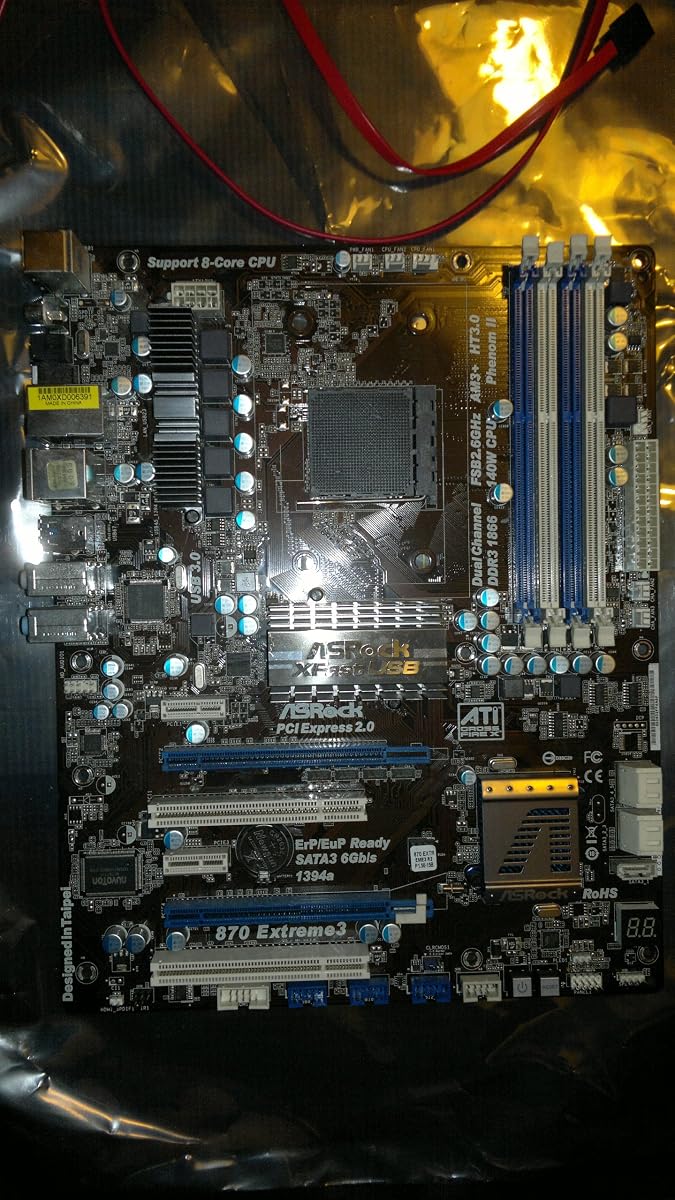
The ASRock 870 EXTREME3 R2.0 combines AMD 870 and SB850 chipsets with Socket AM3+ and AM3 support. Its 3.9 rating and extensive connectivity make it a credible full-size option for legacy desktops that need several conventional expansion slots and multiple SATA devices.
We may earn a commission when you buy through this link, at no additional cost to you.
The board provides two PCIe 2.0 x16 slots operating at x8, supporting ATI Quad CrossFireX and CrossFireX arrangements, plus two PCIe 2.0 x1 and two PCI slots. Five SATA3 ports support RAID 0, 1, 0+1, and 5 configurations, and an eSATA3 port extends external storage options.
Memory support reaches up to 32GB of non-ECC, unbuffered DDR3 across four slots. Atheros Gigabit Ethernet includes Wake-on-LAN support, while Realtek ALC892 audio and both coaxial and optical S/PDIF outputs serve a broad range of older home-theater and desktop configurations.
This is a good match for a repaired AM3+ family computer with legacy cards and a need for RAID-capable SATA3 storage. The 970A-G/3.1 offers USB 3.1 and M.2, while the 990FX EXTREME3 provides more elaborate multi-GPU capability. Choose the 870 board when legacy expansion and mature connectivity are the priorities.
Two conventional PCI slots and two PCIe x1 slots complement the two x16 graphics positions. This is helpful for legacy Ethernet, capture, storage-controller, and other cards that may not have direct modern equivalents. Confirm driver support for every device in the planned operating system.
Realtek 7.1-channel audio with optical and coaxial digital output can simplify connections to older surround systems and receivers. Wake-on-LAN is another practical feature for a desktop that may remain accessible on a home network.
We may earn a commission when you buy through this link, at no additional cost to you.
The ASRock 990FX EXTREME3 is aimed at specialized AM3+ builds requiring extensive graphics-card expansion. Its AMD 990FX chipset supports three PCIe 2.0 x16 slots, with the supplied specifications mentioning AMD Quad CrossFireX, three-way CrossFireX, and Nvidia Quad SLI arrangements.
We may earn a commission when you buy through this link, at no additional cost to you.
Processor support extends across AM3+ and AM3 families, including several Phenom II, Athlon II, and Sempron models. CPUs up to 140W are supported, and features include AMD Cool 'n' Quiet, Hyper-Transport 3.0, and Untied Overclocking. Four DDR3 slots accept up to 32GB of non-ECC, unbuffered memory.
Storage includes five SATA3 ports with RAID 0, 1, 5, and 10 support plus an eSATA3 port. The board also provides 12 USB 2.0 connections, two USB 3.0 ports, digital audio outputs, and Gigabit Ethernet through a Broadcom controller with Wake-on-LAN.
This board makes the most sense for a specialized multi-GPU or heavily expanded legacy build. It is not the most convenient option for a modern everyday system because it lacks USB 3.1 Type-C and M.2 support. The 970A-G/3.1 is more practical for storage and peripheral variety, while this 990FX model prioritizes expansion.
Three physical x16 slots provide one of the broadest graphics arrangements in this list. Lane-sharing and supported card combinations vary by slot, so installers should consult the manual and use graphics cards and bridges appropriate for the intended multi-GPU configuration.
The stated support for CPUs up to 140W signals that this board is intended to handle higher-power AM3+ processors better than many basic alternatives. Untied Overclocking adds tuning flexibility, while adequate cooling and a suitable power supply remain essential for stable operation.
We may earn a commission when you buy through this link, at no additional cost to you.
The ASRock 970DE3/U3S3 uses the AMD 770 northbridge and SB710 southbridge on a Socket AM3+ and AM3 platform. Its defining feature is mixed storage support: two SATA3 ports, six SATA2 ports, and an ATA133 channel for legacy devices.
We may earn a commission when you buy through this link, at no additional cost to you.
A single PCIe 3.0 x16 slot is included alongside three PCIe 2.0 x1 and two conventional PCI slots. The PCIe 3.0 connection is useful for a compatible modern graphics card, while the legacy PCI positions can accommodate older add-on hardware. Four DDR3 slots support up to 32GB of non-ECC, unbuffered memory.
External connectivity consists of two USB 3.0 ports, ten USB 2.0 ports, separate PS/2 mouse and keyboard connections, Gigabit Ethernet, a serial port, and audio jacks. Realtek RTL8111E Ethernet is specified, and the board requires a standard 24-pin ATX connector plus an 8-pin 12V CPU connector.
This board is particularly relevant when a build contains both older optical or hard drives and newer SATA3 storage. The generous total port count may reduce the need for adapters. If fast compact storage is required, the 970A-G/3.1 with M.2 is preferable; if maximum internal drive flexibility is the main concern, the mixed SATA arrangement here remains useful.
Two SATA3 ports support newer conventional drives, while six SATA2 ports and ATA133 cover older equipment. This mixed approach can simplify reuse of existing hardware, although transfer speed will remain limited on the older SATA2 and parallel ATA connections.
The PCIe 3.0 x16 slot can improve graphics-card throughput when paired with a compatible card. Older PCIe x1 and PCI slots preserve support for legacy network, sound, and controller cards, allowing a system to combine current and period-correct components.
We may earn a commission when you buy through this link, at no additional cost to you.
The ASRock 890FX Deluxe4 has the highest supplied rating in the lineup at 5.0. It targets Socket AM3 systems with the AMD 890FX chipset, SB850 southbridge, six-core processor support, and extensive SATA3 and USB 3.0 connectivity.
We may earn a commission when you buy through this link, at no additional cost to you.
Storage is a major strength. The board lists six SATA3 ports, including two provided by a Marvell SE9120 controller, plus an eSATA3 port. RAID 0, 1, 5, and 10 support and the ATA133 channel make it suitable for combining newer drives with legacy storage hardware.
Four DDR3 slots support up to 16GB of non-ECC, unbuffered memory. The expansion section references Quad CrossFireX, while the rear and header connections include four USB 3.0 ports, ten USB 2.0 ports, two IEEE 1394 ports, eSATA3, Realtek Gigabit Ethernet, and Realtek 7.1-channel audio.
The board's rating and rich legacy connectivity make it attractive for a carefully selected AM3 build, especially one using multiple SATA drives or specialized FireWire equipment. However, AM3+ is not explicitly stated, and the 16GB memory ceiling is restrictive compared with the 970A-G/3.1. Modern general-purpose builds should therefore favor the latter.
Six SATA3 ports and eSATA3 provide more conventional storage connections than most alternatives. The Marvell controller expands the board's storage options, but buyers should verify the manual for lane sharing, connector assignments, and boot behavior.
Four USB 3.0 ports and dual IEEE 1394 connections make this board relevant to equipment that needs FireWire. Its maximum memory capacity and processor support are narrower than newer 970-series choices, so those limits should be checked before replacing an existing board.
We may earn a commission when you buy through this link, at no additional cost to you.
Choosing an ASRock AM3 motherboard requires matching the board to an existing processor, memory, case, graphics card, and storage devices. The most important checks are physical fit and platform compatibility, followed by expansion, port, and storage requirements.
AM3 and AM3+ are closely related, but not every board supports every processor. Review the board's CPU list for Phenom II, Athlon II, Sempron, and other supported families, including any stated exclusions. For AM3+ boards, also confirm BIOS support when combining a newer processor with an older board revision.
Match the processor family and thermal requirements before focusing on chipset features. A board that fits physically can still be unsuitable if its power delivery, BIOS, or supported CPU list does not match the processor.
The AMD 760G, 770, 870, 880G, 890FX, 970, and 990FX chipsets appear across this roundup and serve different needs. Basic 760G-oriented designs suit simpler systems, while 970 and 990FX boards tend to offer more expansion, memory, and overclocking features. Integrated graphics are also relevant when processor-based display output is desired.
Choose the chipset according to the features you will actually use rather than the model number alone. Extra graphics slots, RAID support, and older PCI connectors are useful only when the system includes matching hardware.
All ten boards use DDR3 memory, but supported capacity and speed vary. Listed maximums range from 16GB on the 880GXH/USB3 and 890FX Deluxe4 to 64GB on the 970A-G/3.1, while many fall between 16GB and 32GB. Verify speed, voltage, module organization, and dual-channel population requirements.
For a new legacy build, favor the board with enough memory capacity for the operating system and applications. When reusing modules, compare their specifications with the board's supported list and confirm that all modules are suitable for dual-channel operation.
Storage requirements can separate these boards quickly. The 970A-G/3.1 combines six SATA3 ports with a PCIe M.2 slot, making it the strongest choice for a compact modernized AM3 system. Other boards range from SATA2-only designs to SATA3 boards with eSATA, RAID support, or mixed SATA2 and SATA3 connections.
Count every drive before buying and include any optical or archival hardware. Check whether RAID is actually needed, because onboard RAID does not replace a separate backup strategy.
PCI Express x16 slots serve modern discrete graphics, while conventional PCI slots preserve support for older cards. The 990FX EXTREME3 offers three x16 positions, and boards such as the 970 EXTREME3 and 870 EXTREME3 R2.0 combine x16, x1, and PCI slots. Lane sharing and supported multi-GPU configurations require manual verification.
Also consider physical space, not only slot count. Full-length cards, tall coolers, large power supplies, and drive cages can interfere in compact cases even when the motherboard itself is ATX.
USB generation determines which accessories can operate at their intended speed. The 970A-G/3.1 stands out with USB 3.1 Type-A and Type-C, while several alternatives offer USB 3.0 and others rely mainly on USB 2.0. All listed boards include Gigabit Ethernet, and many also include digital audio outputs for legacy entertainment systems.
Inventory the external devices and legacy peripherals that must connect directly. A board may need USB 2.0 for older controllers, IEEE 1394 for specialized equipment, or optical audio for an existing receiver.
ATX boards need a case designed to accept full-size motherboards, while MicroATX models can fit a wider selection of enclosures. Form factor is not the only consideration: connector placement, rear-panel clearance, graphics-card length, and the location of SATA and power headers can still affect assembly.
Compare the board dimensions with the case specifications and inspect the intended position of the power supply and drives. A MicroATX board is usually easier to fit, but a very crowded case can still make installation difficult.
Legacy platforms require attention to the condition and age of the entire system, not merely the motherboard. A new or refurbished board may still need replacement capacitors, a compatible power supply, fresh thermal paste, and an operating system with appropriate driver support.
Plan the purchase as a complete platform. Confirm that the processor, memory, graphics card, cooling, and operating system form a workable combination before replacing the board.
Begin by grounding yourself and gathering the manual before handling the board. Install the processor and cooler according to the manual's orientation instructions, attach the correct ATX and CPU power connectors, and confirm that memory modules are seated with their retaining clips closed. Connect storage and expansion devices only after the board is mounted safely in the case.
When completing the first boot, use the minimum necessary peripherals and enter the BIOS setup screen to confirm that the processor, memory capacity, storage devices, and boot order are detected. Update the BIOS only when needed and using the board's official procedure. Record any compatibility-dependent settings before removing or reinstalling components.
For routine care, keep the board free of dust and maintain unobstructed airflow around the chipset, power circuitry, and processor cooler. Save the board manual and BIOS settings, preserve compatible drivers, and periodically back up data. Because AM3 platforms are older, maintaining current system images and tested replacement parts is especially valuable.
Not automatically. Although AM3+ processors can physically fit some AM3 sockets, chipset support, BIOS support, and power delivery determine whether they function correctly and are supported. Always check the manufacturer's processor list for the exact board model before installing an AM3+ CPU.
These boards generally require DDR3 rather than DDR2 or DDR4. Check the manual for supported speeds, capacities, voltages, and module sizes. For dual-channel operation, use the recommended number of matching modules and populate the correct slots.
Its supplied specifications identify a PCIe M.2 port that supports PCIe drives, making it the clearest M.2 option in this roundup. NVMe compatibility is still system-dependent, so check the manual, operating-system requirements, and any boot or driver limitations before purchase.
The 760GM-HDV, 970M PRO3, and 960GM-VGS3 FX are the MicroATX choices listed here. The 970M PRO3 provides the more capable chipset and modern interface emphasis, while the 760GM-HDV offers detailed eight-core and CPU power support. Case clearance remains important for graphics cards and cooling.
It depends on the processor and board. Some 760G and 880G-based systems can use integrated Radeon graphics, whereas an AM3+ processor without usable integrated graphics generally requires a supported discrete card. The graphics slot layout should also be checked for multi-card plans.
No. RAID can improve availability or performance in supported configurations, but it does not protect against accidental deletion, malware, device failure, or many other data-loss events. Maintain separate backups on independent media or remote storage.
The main constraints are limited processor choices, aging BIOS versions, discontinued components, and the lack of current platform support. Memory availability and operating-system compatibility also matter. Planning a complete compatible system and keeping tested replacement parts can make an AM3 build more reliable.
A used board can be practical when exact compatibility is required and its condition is clear. Inspect for bent sockets, damaged connectors, capacitor leakage, discoloration, and missing components. Confirm that it boots, accepts the intended memory, recognizes storage, and has a clean BIOS before relying on it.
The ASRock 970A-G/3.1 is the strongest all-around recommendation because it combines AM3+ and AM3 support with six SATA3 ports, USB 3.1, and a PCIe M.2 slot. The 760GM-HDV is ideal when processor breadth and eight-core support matter most, while the 970M PRO3 offers a compact AMD 970 platform for MicroATX builds.
Prioritize exact processor compatibility, memory capacity, physical case fit, and required storage before considering optional features. Legacy ATX models may be preferable for conventional PCI cards, multiple graphics slots, RAID, or specialized legacy ports. Users with a basic requirement set can consider the 960GM-VGS3 FX, while multi-GPU builders may prefer the 990FX EXTREME3.
Availability and prices for old motherboard models can vary considerably, so check current listings, seller details, and the final system configuration before ordering. Confirm that every processor, module, drive, card, cable, and case component is supported rather than relying on socket appearance alone.
