
Zalman i4 ATX Mid-Tower
4.4Editor score
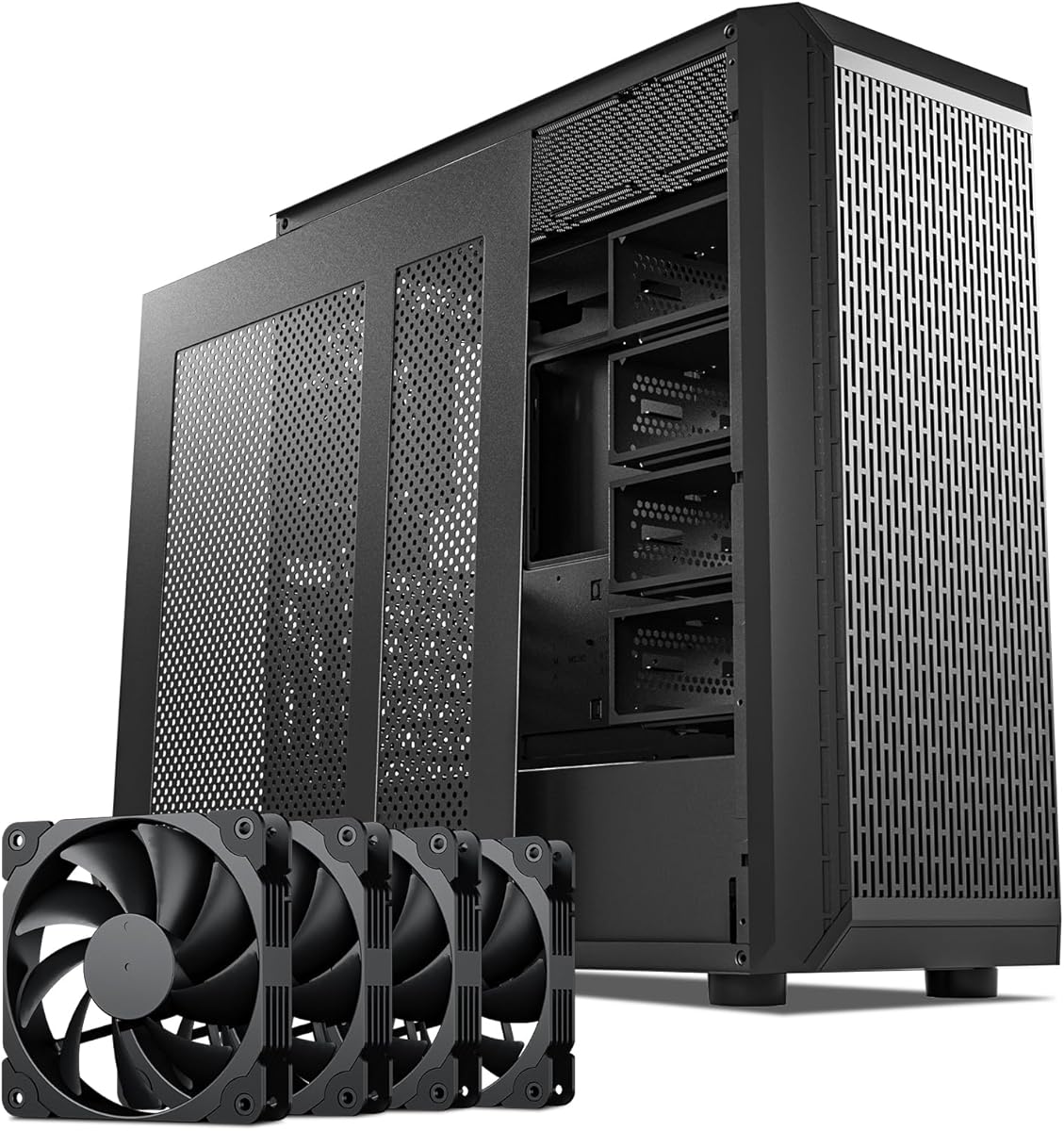
Six 120mm fans included
Vertical PCI slot brackets
Height-adjustable GPU support
Our guide compares 10 PC cases with vertical GPU mounts, covering airflow, clearance, radiators, anti-sag support, compatibility, and build flexibility.
A vertically mounted graphics card can transform the presentation of a gaming PC while giving builders more freedom over the interior layout. The best PC cases with vertical GPU mounts balance showpiece presentation with airflow, cable management, component clearance, and dependable support for heavy or oversized cards.
This guide compares ten cases and mounting solutions using the supplied specifications, customer ratings, cooler support, radiator options, motherboard formats, and vertical-mounting features. It covers complete enclosures as well as dedicated riser-based kits that can add vertical placement to compatible ATX builds.
Each pick highlights the product most likely to suit a particular build, from a well-equipped mid-tower to compact mounting hardware and full-tower showcase systems. Ratings and specifications reflect the information available for this guide, while product availability and prices can change over time.
4.4Editor score

4.8Editor score

4.7Editor score
The comparison covers complete cases and dedicated vertical GPU mounting kits, highlighting the features that most affect compatibility, cooling, cable routing, graphics-card support, and the final appearance of a custom gaming PC.




The SSUPD Xhuttle Black is a complete ATX mid-tower built for builders who want a graphics card to function as a central display element. It carries a 4.7 rating and combines a dual tempered-glass presentation with a dual-chamber interior. Its most attractive feature is the flexible GPU arrangement, which allows the card to be shown upright or installed horizontally depending on the desired appearance and internal clearances.
We may earn a commission when you buy through this link, at no additional cost to you.
Cooling capacity is another major strength. The case comes with three preinstalled 120mm ARGB reverse fans, an RGB strip, and an ARGB controller. It can hold as many as ten 120mm fans and accept dual 360mm radiators, giving builders room to scale up their cooling configuration. The dedicated vertical airflow path is designed to move air through the graphics-card area rather than treating the upright orientation as a purely cosmetic modification.
There are trade-offs to consider. The included fans provide a useful starting point, but the stated capacity for ten fans and two radiators may involve additional purchases depending on the final build. The dual-chamber design also means the power supply and cabling are separated from the main hardware chamber, which improves appearance but requires more deliberate planning around the power-supply dimensions and cable routes. Supported GPUs are listed up to 370mm, so unusually long cards need careful measurement.
This is an excellent recommendation for a builder creating a visually prominent gaming system with a powerful but not excessively long graphics card. It is particularly compelling when the build includes a liquid cooler and several fans. Buyers should confirm graphics-card length, CPU-cooler height, power-supply length, and radiator placement before ordering, but the Xhuttle offers one of the most balanced combinations of presentation, cooling, and build flexibility in this roundup.
The upright GPU position is integrated into the case rather than added as a separate riser accessory. Optimized vertical airflow and the case's fan capacity help preserve cooling around the card, while the option to revert to horizontal mounting gives builders a fallback when clearance is tight.
Dual tempered-glass panels, a separate cable chamber, reverse fans, an RGB strip, and an integrated controller create a coordinated appearance. The supplied lighting ecosystem simplifies the initial setup while leaving room to add compatible components later.
We may earn a commission when you buy through this link, at no additional cost to you.
The HYTE Y70 Taro is a premium ATX mid-tower created for showcase builds where the graphics card, cooling hardware, and cable management all need to look intentional. Its 4.7 rating reflects a strong overall proposition, and the supplied details emphasize a three-piece panoramic glass design, dual-chamber interior, and extensive cooling capacity. The Taro color option adds a distinctive visual theme compared with a conventional black enclosure.
We may earn a commission when you buy through this link, at no additional cost to you.
Its most important vertical-GPU feature is the included color-matched PCIe 4.0 x16 riser, which supports a substantial four-slot graphics card. The milky canopy around the riser is intended to maintain an uninterrupted visual flow inside the panoramic enclosure. This is more than a basic mounting bracket: the product combines a true riser route, a dedicated vertical position, and a carefully coordinated presentation.
Cooling is exceptionally flexible for a mid-tower. The case supports a 360mm radiator on the side, a 68mm-thick top radiator position, and either three 120mm or two 140mm fans along the cold floor. A total fan capacity of ten supports elaborate airflow configurations, although the chassis does not come with the listed fans, so the number and type of cooling hardware should be considered during budgeting.
The Y70 Taro is ideal for builders who regard a PC as a display piece and want the vertical graphics card to be a focal point. Its strengths justify the premium positioning for enthusiasts who value panoramic glass, polished details, and organized internals. The main caveat is that the bundled riser uses PCIe 4.0 rather than PCIe 5.0, so builders should ensure their motherboard and planned graphics-card connection suit that interface. It is also worth checking side and top radiator combinations before finalizing the build.
The four-slot riser solution is integrated with the chassis design rather than treated as a generic add-on. A color-matched canopy helps the cable and card read as part of the overall interior, making the vertical layout suitable for display-oriented builds.
The separated rear chamber provides substantial room for cables, while floating storage sleds, reusable Velcro straps, labeled components, and tool-less panels support a methodical installation process.
We may earn a commission when you buy through this link, at no additional cost to you.
The LIAN LI VG4v4 Black is a dedicated vertical GPU kit rather than a complete computer case. It brings a four-slot mounting arrangement, a PCIe 5.0 x16 riser, and an adjustable anti-sag arm to compatible ATX systems. Its 4.4 rating makes it a strong accessory option for builders who already own a suitable chassis or want more adjustment than a simple bracket offers.
We may earn a commission when you buy through this link, at no additional cost to you.
The included 200mm riser cable is specified for bandwidth up to 32Gbps and is compatible with PCIe 2.0 through 4.0 devices. The mounting system provides three height levels in 10.16mm increments and combines them with forward, neutral, and backward tilt positions. That range makes it easier to balance card visibility, cooling airflow, and the distance between the GPU and the CPU cooler or side panel.
Fitment is the decisive issue. The product requires six accessible expansion slots for vertical mounting or seven for angled mounting, and its bracket measures 168.63 by 147.5 by 234.86mm. Installing the card moves it forward by 31mm, which can affect clearance with bottom fans, radiators, CPU coolers, and motherboard accessories. GPUs up to four slots thick are supported, but some OC buttons, triple full-size DisplayPort layouts, and certain E-ATX accessories may not be compatible.
The VG4v4 is an excellent choice for a builder who has a spacious, carefully selected ATX case and wants a modern PCIe 5.0 vertical solution. It is less appropriate as an impulse purchase because the case layout must be understood before ordering. With that caveat in mind, the adjustable positioning and 10kg support arm make it a versatile and well-engineered mounting kit.
Three height settings and three tilt directions let the installer resolve conflicts that would otherwise force a compromise between card visibility and component spacing. The forward shift is particularly important in cases where the motherboard tray or cooler limits rear clearance.
A PCIe 5.0 x16 riser and a support arm rated for GPUs up to 10kg address both high-speed connection and card weight. The system is aimed at substantial modern graphics cards rather than lightweight, single-slot designs.
We may earn a commission when you buy through this link, at no additional cost to you.
The Zalman i4 ATX is a straightforward ATX mid-tower that delivers the essentials for a vertical graphics-card build without requiring a premium enclosure. It has a 4.4 rating, comes with six 120mm high-airflow fans, and includes both vertical PCI slot brackets and a height-adjustable GPU support bracket. That combination makes it an appealing choice for a budget-conscious first build or a straightforward upgrade.
We may earn a commission when you buy through this link, at no additional cost to you.
Its full-mesh design supports airflow, while the included fans provide a complete starting point for common cooling positions. The top-mounted I/O panel offers audio input and output, USB 3.0, and USB 2.0 connections. Although it does not include the Type-C connectivity and expansive panoramic glass associated with more expensive designs, the listed features focus on practical access and component installation.
The tool-less design should make the initial assembly process more approachable. Vertical mounting is handled with two supplied PCI slot brackets, and the separate anti-sag bracket can be height adjusted to suit the installed card. As with any conversion, builders should check the dimensions of the graphics card, CPU cooler, radiator, and power supply before assembly, because the presence of a vertical bracket does not guarantee clearance in every configuration.
This is a strong recommendation for someone who wants vertical GPU positioning, a useful fan package, and a complete case without paying for elaborate decorative features. It is particularly useful for builders who value airflow and straightforward assembly over a glass-heavy showroom aesthetic. For a visually dramatic build, other options in this guide offer more panoramic viewing, but the i4 ATX delivers the core vertical-mounting experience at a restrained design level.
Six preinstalled 120mm fans make this a complete starting configuration for a new mid-tower. Combined with full-mesh panels, the included hardware gives builders immediate airflow capacity while leaving the option to tune fan positions and performance later.
Two vertical PCI slot brackets and a height-adjustable anti-sag support bracket cover the important mechanical requirements. The included hardware reduces the need to search for a separate mounting solution, although the physical dimensions of the final build still need verification.
We may earn a commission when you buy through this link, at no additional cost to you.
The darkFlash C280 is a dual-chamber E-ATX case designed for builders who want a vertical GPU, extensive cooling options, and a modern motherboard-centered layout. Its 4.7 rating reflects a well-rounded specification list. The case supports E-ATX, ATX, and M-ATX motherboards, includes four PWM fans, and provides room for two 360mm radiators at the top and front.
We may earn a commission when you buy through this link, at no additional cost to you.
Cooling is the defining strength. Its six-sided ventilation system is intended to maintain airflow through every major area of the chassis, while the offset fan mounting and lowered bottom fan create a more direct path. The raised, movable cable cover panel separates the wiring chamber from the display area, helping keep the interior open without restricting the airflow route around the graphics card.
The C280 also supports back-connect motherboards, allowing rear-facing ports to be hidden from the main chamber. Storage placement is adjustable through the HDD cage, and the enlarged power-supply chamber provides room for larger power supplies and their cables. A front Type-C connection and the included fans add convenience without requiring the entire cooling system to be purchased separately.
This case is best suited to E-ATX builders who prioritize airflow, radiator flexibility, and a tidy motherboard area around a vertical graphics card. The main uncertainty is that the supplied information does not state a maximum GPU length, so buyers should compare their card with the case dimensions and mounting position. It is also less immediately flexible than the HYTE Y70 or the dedicated riser kits, whose vertical arrangements are described in greater detail. Within its intended format, however, the C280 offers an effective combination of cooling and organization.
The ventilation layout, offset fan positions, and lowered bottom fan create an airflow channel around the main chamber. These details are particularly relevant when the graphics card is mounted vertically and occupies a large portion of the visible interior.
E-ATX support and compatibility with back-connect motherboards make the C280 relevant to current platform designs. The dual-chamber layout provides a defined home for cables while the raised cover keeps the main hardware view relatively clean.
We may earn a commission when you buy through this link, at no additional cost to you.
The Thermalright A70ATX stands out for its 4.8 rating, the highest in this collection, and for a strong focus on presenting the graphics card. Its three-sided pillar-free tempered glass creates a 270-degree panoramic view, removing structural columns that could interrupt the appearance of an upright GPU. The case supports ATX, M-ATX, and Mini-ITX motherboards.
We may earn a commission when you buy through this link, at no additional cost to you.
A removable, tool-free quick-release vertical GPU bracket is a particularly useful feature. The bracket accommodates graphics cards up to 420mm in length and can be adjusted through screws behind the motherboard tray. That combination addresses both installation convenience and the tendency of long, heavy cards to sag. The stated CPU-cooler limit is 168.4mm, and the power-supply area supports ATX units up to 200mm long.
The front Type-C 3.0 connection is specified for data rates up to 10Gbps. The I/O also includes audio, two USB Type-A ports, and the power button. A fixed module accommodates a 360mm radiator, and the chassis includes a dedicated hard-drive bay, giving the case a more complete foundation for a high-end build. Its broad GPU allowance is particularly useful for builders selecting a long premium graphics card.
The A70ATX is an excellent recommendation for a showcase build in which the GPU is the visual centerpiece. The 420mm allowance, panoramic glass, and adjustable anti-sag bracket make it especially relevant to owners of large modern cards. Builders should still check the CPU cooler and power-supply dimensions, and they should not assume the case includes a full set of fans. Within those constraints, it offers one of the most compelling combinations of presentation, card compatibility, and accessible mounting hardware.
Pillar-free glass on three sides creates a broad view of the internals. A vertical card can therefore become the central visual element rather than sitting behind a narrow viewing window or structural frame.
Support for cards up to 420mm provides meaningful headroom for large models. The adjustable anti-sag bracket and quick-release mounting arrangement help make installation and ongoing support more straightforward.
We may earn a commission when you buy through this link, at no additional cost to you.
The DARKROCK Classico Storage Master is an ATX case aimed at builders who need substantially more drive capacity than a conventional gaming PC enclosure. It carries a 4.4 rating and supports up to thirteen hard drives. For a NAS enthusiast who also wants a display-quality gaming system, the vertical GPU mount allows the graphics card to remain visible while the chassis concentrates on storage.
We may earn a commission when you buy through this link, at no additional cost to you.
Its mesh front and side panels encourage airflow across both the drives and the main hardware area. Four 120mm fans are included, providing a reasonable foundation for intake and exhaust. A 360mm radiator can also be installed, which gives builders the option to use liquid cooling when the storage layout and drive arrangement leave sufficient room.
The vertical mounting function serves two purposes according to the product details: it presents the graphics card and helps prevent sagging while keeping it at an appropriate position for cooling. This makes the Classico more specialized than a typical mid-tower. The large number of drive bays and storage-oriented architecture may be unnecessary for a system focused solely on games, but they are valuable for media storage, backups, and workstation use.
The Classico is a compelling choice for a combined gaming and NAS build that values function and storage density. It should not be selected solely for a minimalist appearance; its design is purpose-driven. Because the supplied specifications do not list maximum GPU length, the graphics card's dimensions should be checked against the case and vertical bracket. For a builder who needs many drives, however, the Classico offers an unusual and capable combination of vertical presentation and high-capacity storage.
The case is designed around a high drive count, but it does not force the graphics card into an unseen conventional position. A vertical mount preserves the card's visual role while the larger chassis accommodates the storage hardware.
Mesh panels and four included fans support the thermal needs of both a storage-heavy system and its computing components. The additional 360mm radiator option gives builders room for a more substantial cooling solution.
We may earn a commission when you buy through this link, at no additional cost to you.
The darkFlash AIR NOVA is a white full-tower for builders who want abundant space, extensive cooling, and a vertical graphics-card display. It has a 4.2 rating, which is the lowest among the listed products, but the specification package is substantial. Seven PWM ARGB fans are included, and the case supports E-ATX, ATX, and M-ATX motherboards.
We may earn a commission when you buy through this link, at no additional cost to you.
The six-sided ventilation system is designed to support high airflow throughout the enclosure. Cooling flexibility includes two 360mm radiators, positioned at the top and front, while the raised and movable cable cover helps create a direct channel through the main chamber. The full-tower format provides additional space for storage, a larger power supply, and extensive cable routing.
A dedicated vertical GPU mount and reinforced metal support bracket allow the graphics card to be displayed while resisting sag. Back-connect motherboard compatibility is also supported, and front Type-C connectivity adds a modern external interface. The white finish and included ARGB fans create a coordinated appearance for showcase-oriented builds, although the case depends on the builder's chosen components for much of its final visual impact.
The AIR NOVA is best for an enthusiast system that needs room for multiple radiators, several fans, and a vertically mounted card. Its full-tower dimensions may be excessive for a compact installation, and buyers should account for desk depth and floor space. The lower rating should not be dismissed automatically, but it makes the case less of a universal recommendation than the higher-rated mid-tower options. Those seeking maximum capacity and a coordinated white ARGB platform will find it particularly compelling.
Seven PWM ARGB fans provide a generous starting point for a full-tower airflow plan. The included lighting and fan quantity make the enclosure practical for builders who do not want to assemble an entire cooling configuration from scratch.
The larger format supports two 360mm radiators, E-ATX motherboards, and an expanded power-supply chamber. That additional volume makes it easier to combine a vertical GPU, extensive storage, and a sophisticated cooling arrangement.
We may earn a commission when you buy through this link, at no additional cost to you.
The LIAN LI VG4v4 White is the light-finished counterpart to the black vertical GPU kit in this roundup. It combines a four-slot mount, a PCIe 5.0 x16 riser, and an adjustable support arm for GPUs up to 10kg. The white finish makes it particularly useful for builders coordinating a pale-themed PC with visible or white components.
We may earn a commission when you buy through this link, at no additional cost to you.
The mounting bracket provides three height levels at 10.16mm increments, along with forward, neutral, and backward tilt choices. These adjustments help optimize card visibility and accommodate nearby fans, radiators, CPU coolers, and motherboard accessories. The 200mm PCIe 5.0 riser cable is compatible with PCIe 2.0 through 4.0 devices as well as PCIe 5.0 hardware.
As with the black version, compatibility requires care. The kit needs six accessible expansion slots for vertical mounting or seven for angled mounting. The bracket measures 168.63 by 147.5 by 234.86mm and moves the installed graphics card forward by 31mm. Full-size DisplayPort arrangements, GPU OC buttons, some E-ATX motherboard accessories, and certain cooling components can interfere with the intended position.
The white VG4v4 is a strong choice for a builder with a compatible ATX case who wants modern PCIe 5.0 support and coordinated light-colored hardware. It offers more adjustment than a simple vertical bracket and can handle a substantial four-slot card. It should be purchased only after the case layout, expansion slots, and internal clearance have been checked. For a white showcase system with a roomy chassis, it provides an attractive and mechanically flexible solution.
The white finish integrates with light-themed components without requiring a separate color treatment. Combined with the four-slot format, it allows a substantial graphics card to remain a visible centerpiece inside a coordinated enclosure.
Height and tilt adjustments help position a large card where it can be seen without colliding with nearby hardware. The forward, neutral, and backward positions offer useful flexibility when a case's internal geometry is not perfectly standardized.
We may earn a commission when you buy through this link, at no additional cost to you.
The Cooler Master Gen5 Vertical Graphics Card Holder is a mounting kit for builders who already have a compatible case and want a vertically displayed GPU without replacing the enclosure. It has a 4.2 rating and combines a 165mm PCIe 5.0 riser with a reinforced steel support structure. The included riser supports current high-speed graphics cards and remains compatible with PCIe 4.0 and older standards.
We may earn a commission when you buy through this link, at no additional cost to you.
Its case compatibility is unusually broad. The holder is designed for E-ATX, ATX, and Micro-ATX cases, supports graphics cards of any length, and accommodates cards up to three slots wide. A minimum of four PCI slots is required. The broad length allowance is useful because the support structure handles the weight rather than relying on the card's own connector.
Position adjustment is tool-less and operates in two directions. The GPU can move up to 65mm toward the front panel and 30mm toward the side panel, giving builders room to improve visibility, airflow, and clearance. The reinforced SGCC steel is intended to reduce flex and sagging, while the sequence of installing the bracket before the graphics card simplifies assembly.
This holder is a good fit for a builder who values flexible positioning, a current-generation riser, and broad motherboard-case support. Its main limitation is the three-slot maximum, which excludes some unusually thick four-slot graphics cards. It is also an accessory rather than a complete case, so the buyer must already own a suitable enclosure. Subject to those considerations, it is a clean, adaptable solution for making a large GPU the centerpiece of an existing build.
Two-direction movement allows the installer to shift the card without reaching for tools during alignment. The generous 65mm frontward and 30mm sideways movement helps resolve conflicts around radiators, fans, and the tempered-glass panel.
Reinforced SGCC steel takes the role of a dedicated graphics-card support arm. Supporting any card length is convenient, although the holder remains limited to GPUs no more than three slots thick.
We may earn a commission when you buy through this link, at no additional cost to you.
Choosing a vertical GPU case requires balancing presentation with the practical limits of card dimensions, cooling hardware, cable routing, motherboard format, and expansion-slot availability. The right enclosure should make the graphics card visible without forcing compromises elsewhere in the build.
Measure the complete card rather than relying only on the length advertised by the GPU manufacturer, and include the height of its power connectors and any accessories on the bracket. In short, confirm both length and thickness against the case or kit before ordering.
Look for a coherent intake and exhaust path, compatible fan positions, and enough clearance for radiators. In short, prioritize airflow that remains effective when the card is displayed upright.
Count the available slots and inspect the rear slot opening before selecting a kit. In short, choose a mounting system whose slot and riser requirements match the case you already own.
Choose a support that matches the card's weight and can be positioned without blocking connectors. In short, never rely on the motherboard slot alone to carry a heavy vertical card.
Verify the board format, socket area, I/O arrangement, and accessory clearance before selecting a case. In short, start with motherboard compatibility and then evaluate the vertical GPU features.
Check the permitted radiator thickness, fan thickness, and mounting position before selecting a cooling upgrade. In short, treat radiator clearance as part of the GPU-clearance check rather than a separate afterthought.
Look for a dedicated cable chamber, usable tie-down points, and enough space for power-supply leads. In short, preserve the clean view that made you want a vertical card in the first place.
Decide whether the graphics card orientation should drive the entire case choice or simply be adapted within an existing system. In short, do not compare a complete case as though it were interchangeable with a mounting kit.
Before installing the graphics card, identify every component that could affect its position. Measure the card, check the case's stated GPU allowance, and inspect the positions of bottom fans, radiators, the CPU cooler, and the power supply. For a riser-based kit, confirm that the rear expansion slots, motherboard position, and connector orientation can accommodate the card without forcing the cable into a sharp bend.
Install the case's vertical mounting hardware before the graphics card whenever the manufacturer recommends that sequence. Connect the PCIe riser, route the cable gradually, and secure the anti-sag support at its intended height. Tighten screws evenly and avoid pressing against glass panels or the card's cooler. The supplied instructions for the LIAN LI and Cooler Master products specifically emphasize checking dimensions and reviewing installation requirements first.
After the build is complete, inspect the card periodically, especially if the system has been moved. Confirm that the support remains firm, the riser is not pulled tight, and no cables press against connectors. Keep the intake and exhaust paths clear of dust, and clean mesh filters and fans according to the case manufacturer's guidance. For storage-heavy systems such as the DARKROCK Classico, include regular drive-area airflow and dust inspection in the same maintenance routine.
A properly installed vertical mount does not inherently reduce graphics-card performance. The main concerns are adequate airflow around the card, a supported riser connection, secure anti-sag hardware, and unobstructed power and DisplayPort cables. A case designed for vertical airflow and equipped with suitable intake and exhaust fans can maintain a comparable cooling environment.
No, because cards vary in length, thickness, connector placement, and weight. The Thermalright A70ATX supports cards up to 420mm, while the SSUPD Xhuttle supports up to 370mm. Dedicated kits may impose their own width limits or move the card forward, so dimensions should be checked against the complete mounting arrangement.
It depends on the case and mounting system. Some complete cases position the motherboard so a standard PCIe connection reaches the vertical card, while others include a riser. The HYTE Y70 includes a PCIe 4.0 x16 riser, and both LIAN LI VG4v4 kits include PCIe 5.0 x16 riser cables.
A PCIe 5.0 x16 riser is designed for high-bandwidth modern graphics-card connections. The LIAN LI VG4v4 kits specify a 200mm cable with bandwidth up to 32Gbps and compatibility with PCIe 2.0 through 4.0 devices, while the Cooler Master holder includes a 165mm PCIe 5.0 riser. Always confirm that the motherboard slot, riser, and graphics card are all compatible.
Clearance depends on the case, card, and cooling hardware. The LIAN LI VG4v4 shifts the GPU forward by 31mm, so bottom fans, radiators, CPU coolers, and motherboard accessories can interfere. Measure the available space rather than relying only on the case's published maximum GPU length.
They are strongly advisable for large or heavy cards because the motherboard's PCIe slot is not designed to carry the card's full weight continuously. The Zalman i4, Thermalright A70ATX, darkFlash AIR NOVA, and both LIAN LI kits all include dedicated support hardware. The support should be adjusted so it bears the weight without obstructing connectors.
It can, but only if the motherboard and case layout allow the card to sit upright without interfering with cooling or cable routing. Dedicated kits offer height and tilt adjustments, while complete cases may provide a more integrated arrangement. Builders should compare the case's expansion slots and internal dimensions before assuming a conversion will be straightforward.
The DARKROCK Classico is specifically oriented toward systems that need many drives. It supports up to thirteen hard drives, includes four 120mm fans, accepts a 360mm radiator, and offers a vertical GPU mount. It is best suited to users whose storage requirements justify a larger, more specialized enclosure.
The SSUPD Xhuttle Black is the strongest all-around recommendation because it combines a polished dual-chamber design, flexible GPU orientation, three included ARGB fans, and room for substantial cooling. The HYTE Y70 Taro is the premium showcase choice, while the Zalman i4 ATX delivers the most practical vertical GPU package for builders who prioritize included fans and straightforward functionality.
Your priority should ultimately match your build. Choose a panoramic case for maximum visual impact, a riser kit for precise adjustment in an existing chassis, a full tower for extensive cooling and expansion, or the DARKROCK Classico when storage is the defining requirement. In every case, verify graphics-card dimensions, slot availability, cooler clearance, radiator thickness, and anti-sag support before finalizing the purchase.
Ratings can change as buyers submit additional feedback, and product availability, configurations, and prices also vary over time. Review the current listing and manufacturer specifications before ordering, particularly for a riser-based system where even a small difference in expansion-slot access or internal clearance can determine whether the vertical mount works as intended.